


How can I set a persistent preference for "pages per sheet" when printing?

After I print a page, Firefox seems to remember most of the options I chose for next time.
For example, if I print using some custom margins, Firefox will default to those same custom margins the next time I print a page. The same for duplex options - Firefox remembers that I want to print double-sided and with "Flip on short edge".
However, it doesn't remember my "pages per sheet" settings. It's annoying because I always print 2 pages per sheet, but Firefox defaults to 1. So I need to change that setting to 2 every time I print. If I forget, I wastefully use twice as much paper.
I've checked in about:config and `print.save_print_settings` is set to `true`. Like I say, most of my settings do get saved, but not "pages per sheet".
Is there anything I can do to set a persistent preference for this?
Giải pháp được chọn
I found this in the OpenSuse forum, which seems like the same issue. I also asked the engineers, and finally got a confirmation that there's no pref for this setting and they encourage the user to file a bug. Would you be comfortable to do that, @pg_78?
Tất cả các câu trả lời (5)

Look at your printer settings. Firefox browser users the printer settings given to it by the printer software.
markwarner22 said
Look at your printer settings. Firefox browser users the printer settings given to it by the printer software.
No, Firefox doesn't just "use the printer settings given to it by the printer software". Firefox has its own set of printer preferences in about:config. And if the preference 'print.save_print_settings' is set to 'true', then they get auto-updated based on what you chose the last time you printed in Firefox. The screenshot shows an example.
What I'm asking for is how to add "pages per sheet" to those configured preferences.
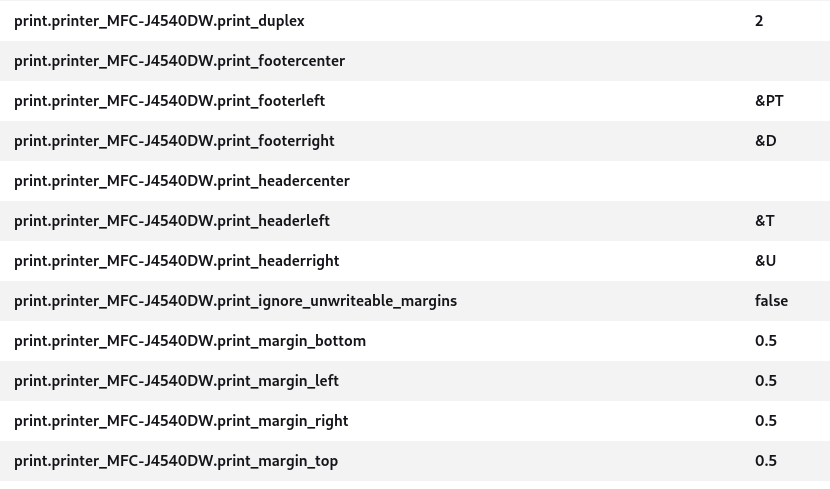
Được chỉnh sửa bởi pg_78 vào
Giải pháp được chọn
I found this in the OpenSuse forum, which seems like the same issue. I also asked the engineers, and finally got a confirmation that there's no pref for this setting and they encourage the user to file a bug. Would you be comfortable to do that, @pg_78?
Kiki said
I found this in the OpenSuse forum, which seems like the same issue. I also asked the engineers, and finally got a confirmation that there's no pref for this setting and they encourage the user to file a bug. Would you be comfortable to do that, @pg_78?
Thanks Kiki! I've raised this as bug 1964466 in Bugzilla.
pg_78 said
Thanks Kiki! I've raised this as bug 1964466 in Bugzilla.
Amazing! Thanks for filing the bug. (: