


Bookmark icons are generic and colorless on Windows 11

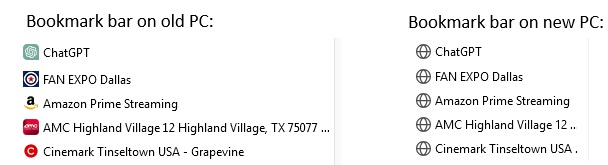
I just upgraded from an older computer OS to Windows 11. I imported my bookmarks but really hate the new look of the bookmarks bar in Win11. The icons are all generic and have no color. I've attached a screen shot illustrating.
I just upgraded from an older computer OS to Windows 11. I imported my bookmarks but really hate the new look of the bookmarks bar in Win11. The icons are all generic and have no color. I've attached a screen shot illustrating.
Giải pháp được chọn
Did you try to visit each bookmark to make Firefox retrieve the favicon from the website?
Đọc câu trả lời này trong ngữ cảnh 👍 1Tất cả các câu trả lời (2)
Giải pháp được chọn
Did you try to visit each bookmark to make Firefox retrieve the favicon from the website?
Well, I'm embarrassed. I had tried that with the first bookmark (ChatGPT) and it didn't change. But I tried it with some of the others (per your cor-el's recommendation) and it worked.