


Google ReCAPTCHA is not working on all websites

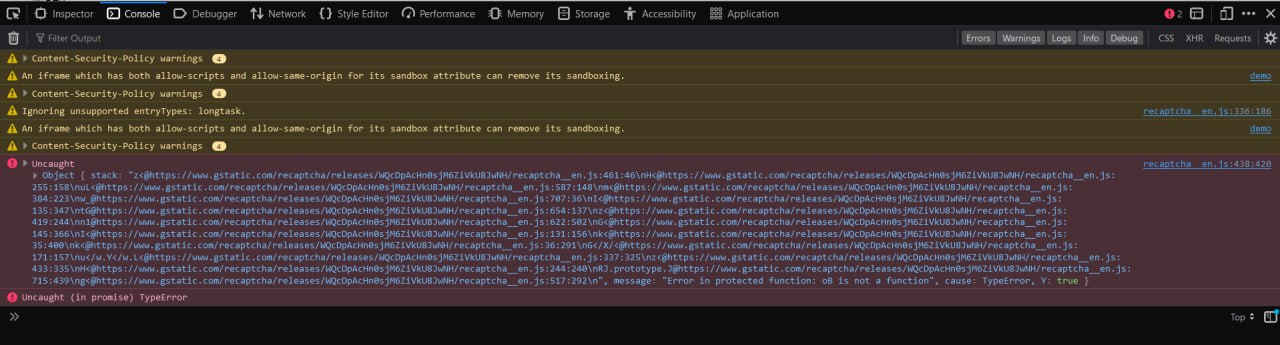
Google ReCaptcha is not working on literally all websites. Once I click on checkbox "I'm not a robot" It gets stuck on infinite loop. Although working on Mac OS in Firefox and Chrome or any other browsers. The issue is primarily with Windows version
I already tried clearing cookies, cache, disabling Tracking Protection, adding sites to DNS white list
Environment: OS Windows 11 Version 23H2, Firefox 125.0.3 For testing used: https://www.google.com/recaptcha/api2/demo

Được chỉnh sửa bởi Maxim L vào
Tất cả các câu trả lời (6)
Try changing DNS over HTTPS (DoH) to "Off" or "Max Protection" and in Connection Settings change "Use system proxy settings" to "No proxy".
Does it still happen in Troubleshoot Mode?

Same issue! randomly started happening yesterday, spent hours and literally tried everything. It works fine on microsoft Edge! Please tell me there's a solution for this.
Temporary fix but good work around for now- As another user instructed, download the following extension. User-Agent Switcher by Erin Schlarb Set the default to windows/chrome 123 Recaptcha all work normally now. Looks like firefox is getting blocked somehow.
Like you posted, only Firefox with a Windows user agent seems to be affected. It works for me with a MAC user agent and with a Linux user agent.

I have the same issue. The user-agent switcher solution doesn't help. The problem doesn't happen on Chrome browsers.
Google has fixed this issue, so you no longer need the extension or about:config to override the user agent and can use your default user agent.