


Windows 10 reached EOS (end of support) on October 14, 2025. For more information, see this article.

Tìm kiếm hỗ trợ

Tránh các lừa đảo về hỗ trợ. Chúng tôi sẽ không bao giờ yêu cầu bạn gọi hoặc nhắn tin đến số điện thoại hoặc chia sẻ thông tin cá nhân. Vui lòng báo cáo hoạt động đáng ngờ bằng cách sử dụng tùy chọn "Báo cáo lạm dụng".

Tìm hiểu thêm

Attachment with very long filename pushes action buttons out of window

  • 1 trả lời
  • 0 gặp vấn đề này
  • 29 lượt xem
  • Trả lời mới nhất được viết bởi Doctor Bashir

tuỳ chọn khác

When a message arrives with an attachment that has a very long filename, the header section at the top of the message pane is also expanded to the length of the filename. This causes the actions buttons to be pushed off of the header section.

Here are two screenshots that show this. The first is the attachment section at the bottom of the message pane, the second is the header section.

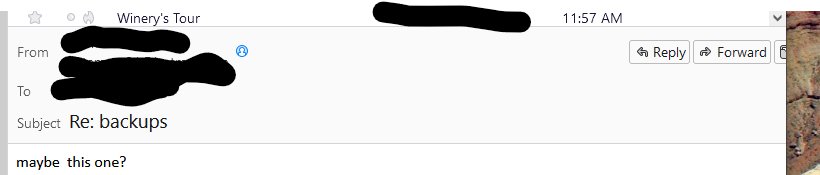
When a message arrives with an attachment that has a very long filename, the header section at the top of the message pane is also expanded to the length of the filename. This causes the actions buttons to be pushed off of the header section. Here are two screenshots that show this. The first is the attachment section at the bottom of the message pane, the second is the header section.
Đính kèm ảnh chụp màn hình

Tất cả các câu trả lời (1)

tuỳ chọn khác

Actually the entire message pane is expanded to the length of the attachment filename. So if the message window is narrower than the filename, all elements of the message pane justified to the right (scroll bars, buttons, etc) are pushed off the window and not accessible. The window with the message pane must be widened until the filename is fully displayed.

Được chỉnh sửa bởi Doctor Bashir vào