Word and some jpg attachmets not opening. AOL says it is a browser problem. Have cleared cache (previous advice) still got problem. This a new problem last month. Help please

Clearing the cache and opening in troubleshoot mode did not help, hence repeated question. All attachments open in Edge and Chrome but I like Firefox so very like to fix the problem. Many thanks for help on this
Tất cả các câu trả lời (6)
How are you opening those files ? Are that email attachments or a link on a webpage or something different ? Does Firefox show an ope with dialog ?
These are standard email attachments showing as the file title and type (eg jpg., pdf., docx.) in blue button below email To/From/Subject lines. docx. and doc. do not open, all pdf.s do and some jpg.s co not.
Previously (some months ago) I recall when I clicked on an email attachment a dialogue box opened offering Open or Save, but this stopped and attachments opened by cling on blue button file title.
I have reviewed the links you suggested but found no solution to my problem
Many thanks your continuing assistance
The most common causes for such an issue are caused by how the server is sending the files (content-disposition), so you can possibly check the HTTP response headers via the Network Monitor.
- "3-bar" menu button -> Web Developer or Tools -> Browser Tools -> Web Developer Tools
- https://developer.mozilla.org/en-US/docs/Tools/Network_Monitor
Hi cor-el I have opened Network Monitor but cannot see how to check the HTTP response headers or what do do if I did find them (which I have not).
Given that my problem is new and never happened before with Firefox (or with AOL) I cannot see what would have happened to cause this problem
Any other ideas?
DavidWalker said
These are standard email attachments showing as the file title and type (eg jpg., pdf., docx.) in blue button below email To/From/Subject lines. docx. and doc. do not open, all pdf.s do and some jpg.s co not. Previously (some months ago) I recall when I clicked on an email attachment a dialogue box opened offering Open or Save, but this stopped and attachments opened by cling on blue button file title.
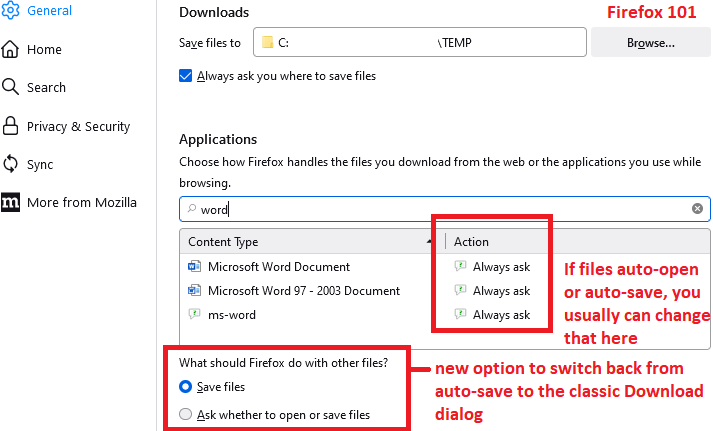
You usually can control what happens with those specific content types on the Settings page. Check out the steps in this article: Manage file types and download actions in Firefox.
Firefox 101 also has a new "catch-all" setting below the Applications list so that non-standard types can continue to auto-save OR you can go back to having Firefox show the classic Download dialog.

Can you get those set up the way you need?