


Windows 10 reached EOS (end of support) on October 14, 2025. If you are on Windows 10, see this article.

Tìm kiếm hỗ trợ

Tránh các lừa đảo về hỗ trợ. Chúng tôi sẽ không bao giờ yêu cầu bạn gọi hoặc nhắn tin đến số điện thoại hoặc chia sẻ thông tin cá nhân. Vui lòng báo cáo hoạt động đáng ngờ bằng cách sử dụng tùy chọn "Báo cáo lạm dụng".

Tìm hiểu thêm
Đã lưu trữ

popup volume meter won't go away

Paul đã trả lời
rtinsay

I disabled the popup "Firefox is playing me ..." by entering about:config in the URL bar and set media.hardwaremediakeys.enabled = false. This worked okay.

HOWEVER, the volume popup meter still often appear when I watch videos on youtube. It is stuck on the screen and not only is it annoying and won't go away unless I restart. Killing the browser alone does not get rid of it.

When I try to do multitasking ... whatever icon/button functions I click on ... they refuse to cooperate.
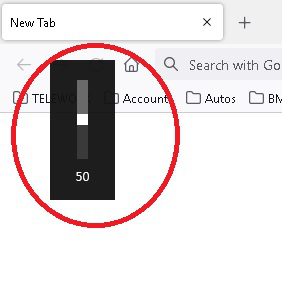
I disabled the popup "Firefox is playing me ..." by entering about:config in the URL bar and set media.hardwaremediakeys.enabled = false. This worked okay. HOWEVER, the volume popup meter still often appear when I watch videos on youtube. It is stuck on the screen and not only is it annoying and won't go away unless I restart. Killing the browser alone does not get rid of it. When I try to do multitasking ... whatever icon/button functions I click on ... they refuse to cooperate.
Đính kèm ảnh chụp màn hình

Tất cả các câu trả lời (1)

Hi

I strongly recomend not going into about:config and changing settings there as it can have unintended consequences.

The volume control in your screenshot looks more like the controls on your computers operating system than the one for YouTube. The issue might be with Windows 10 - are you missing any updates?