

Chủ đề này đã được lưu trữ.
Vui lòng hỏi một câu hỏi mới nếu bạn cần giúp đỡ.

Đã giải quyết
Đã lưu trữ
Previously visited domain urls are not auto-suggested rather search with google on search bar

Hi Team,
I have a dynamic web URL like test/something, when i visit the webpage for the first time using http://test/something it will be navigated to the particular domain page as expected. But if i try to visit again the same domain address like test/someotherurl it must be auto suggested and recognized as a web URL (http://test/someotherurl) rather taking me/suggesting for a google search when i click enter. Also it is not shown anywhere. All other browsers and older versions (78) of firefox was showing this. I request you to kindly suggest me a way to fix this.
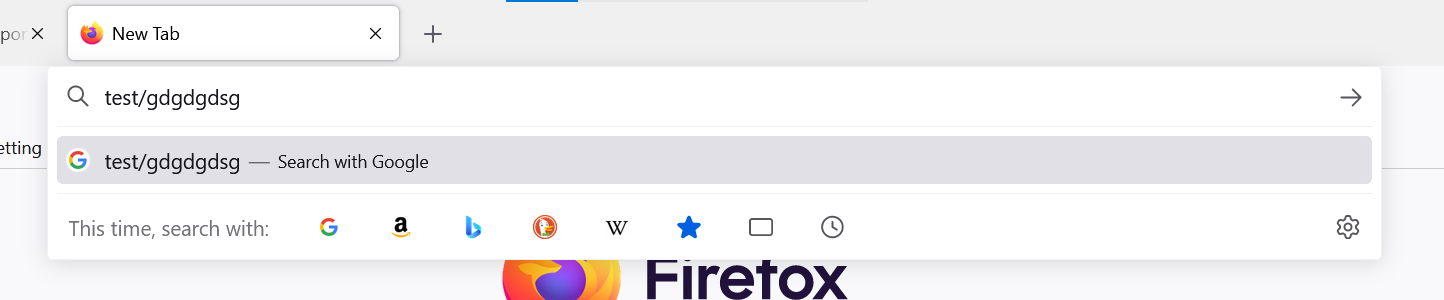
Attached a screenshot for the scenario. You can see only search with google suggestion is there. previously i visited http://test/someurl from the same browser. So here every time i need to type http in front of a url.
Hi Team,
I have a dynamic web URL like test/something, when i visit the webpage for the first time using http://test/something it will be navigated to the particular domain page as expected. But if i try to visit again the same domain address like test/someotherurl it must be auto suggested and recognized as a web URL (http://test/someotherurl) rather taking me/suggesting for a google search when i click enter. Also it is not shown anywhere. All other browsers and older versions (78) of firefox was showing this. I request you to kindly suggest me a way to fix this.
Attached a screenshot for the scenario. You can see only search with google suggestion is there. previously i visited http://test/someurl from the same browser. So here every time i need to type http in front of a url.
Tất cả các câu trả lời (1)
Giải pháp được chọn
This helps me to solve this.
1) In a new tab, type or paste about:config in the address bar and press Enter. Click the button promising to be careful.
(2) In the search box above the list, type or paste keyw and pause while the list is filtered
(3) Double-click the keyword.enabled preference to toggle it from true to false.