FF 63.0: Rendering a site fails after dynamically changing the css property "display" via jquery

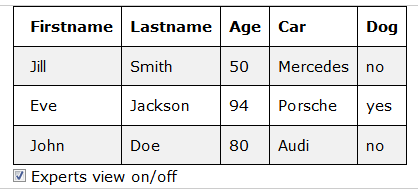
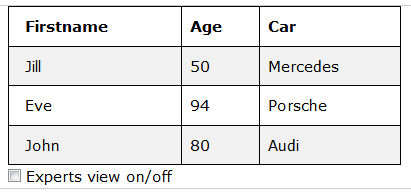
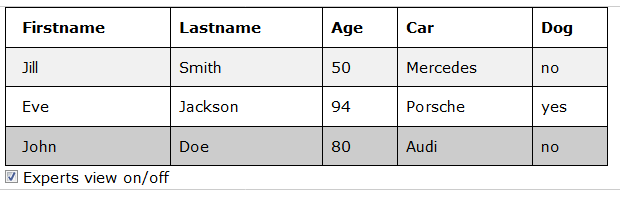
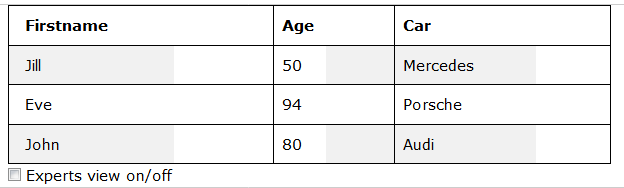
Hello community, after updating my FF from 62.03 to 63.0, I experience a strange behaviour. I use the css properties "display:none" and "display:table-cell" to dynamically show and hide table columns. Prior to FF 63.0 everything worked excellent. But now, after hiding columns (by altering the css property form "display:table-cell" to "display:none"), the table and its content is displayed properly but some of the cells are missing their defined background colour. As soon as doing some action which forces a redraw of the window (e.g. resize the window or scroll the window), the complete table is diplayed properly . In order to give an impression feel free to have a look at the attached images Pre-Collapsed-Table.png, Collapsed-Table.png and Expected-Collapsed-Table.png. Meanwhile I have been playing with the "visibility" attribute in order to get the desired result. Unfortunately this is not suitable because hidden elements take up space on the page.
Is it a bug in FF 63.0? What can I do to get the previous and expected behaviour? Any ideas? Thanks in advance.


Tất cả các câu trả lời (2)
Can you provide a working example on the https://jsfiddle.net/ or https://codepen.io ? Thanks.
Hi TyDraniu,
thanks for reply. I have preprared two temporary samples using the same code, one at fiddle and one at codpen.
Fiddle: https://jsfiddle.net/2xunvjc6/ Codepen: https://codepen.io/anon/pen/JmxKgx
After looking at the results, confusion and surprise reached a new level. At fiddle the sample works, at codepen it fails!!! In both cases, I was using the same broweser (FF 63). I made local copies of the fiddle resultcode and the codepen resultcode and ran it in separate new tabs. I got the same faulty result, whatever code I had been using.
I checked both samples with latest Version of Chrome browser, and everything was fine.
Attached some screenshots of fiddle and codepen.
Weird, isn't it?