


Download Files are not dragging to desktop properly

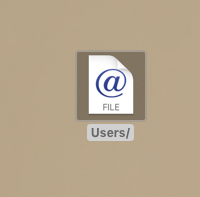
I am no longer able to drag and drop my downloaded files from Firefox directly to my desktop (ex: downloading a .pdf and dragging it to desktop). When I do that the file shows up as "file internet location" with the @ and the word "file" underneath it.
I've re-installed Firefox, reset download settings, etc. Nothing is working. Please help!
I've provided a screen shot of what the file looks like when dragged from my download file to the desktop.
Tất cả các câu trả lời (5)

I believe that the computer or browser thinks you want to place the link on the desktop. Not the file itself.
Thanks, Fred. How do I fix this if that's the case? Thanks!
Download the file, then place it where you want.
Could be his bug:
- bug 1358075 - Fx53 no longer assigns user-friendly names to .webloc files on OS X
Please do not comment in bug reports
https://bugzilla.mozilla.org/page.cgi?id=etiquette.html
Thank you! It looks like it might be...how do I fix it?