


Windows 10 reached EOS (end of support) on October 14, 2025. For more information, see this article.

Tìm kiếm hỗ trợ

Tránh các lừa đảo về hỗ trợ. Chúng tôi sẽ không bao giờ yêu cầu bạn gọi hoặc nhắn tin đến số điện thoại hoặc chia sẻ thông tin cá nhân. Vui lòng báo cáo hoạt động đáng ngờ bằng cách sử dụng tùy chọn "Báo cáo lạm dụng".

Tìm hiểu thêm

fonts

  • 1 trả lời
  • 1 gặp vấn đề này
  • 7 lượt xem
  • Trả lời mới nhất được viết bởi cor-el

tuỳ chọn khác

Turned my PC off this morning . Started it shortly after and Firefox updated to the latest version. After the update I found that Google, Facebook and may other websites are showing a strange narrow font with the horizontal parts of E F etc missing and it's all in capitals. Checked for viruses and malware and PC clean. Running Windows 10 64bit. I have Times New Roman as my selected font (tools - options - content) but, regardless it still shows this odd font regardless of what font I set it to and won't change. I installed Opera and that's showing things correctly.
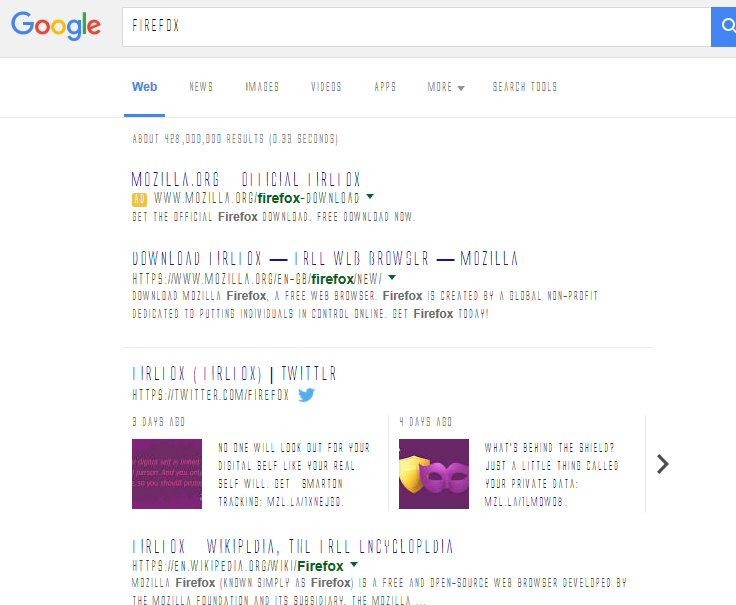
Turned my PC off this morning . Started it shortly after and Firefox updated to the latest version. After the update I found that Google, Facebook and may other websites are showing a strange narrow font with the horizontal parts of E F etc missing and it's all in capitals. Checked for viruses and malware and PC clean. Running Windows 10 64bit. I have Times New Roman as my selected font (tools - options - content) but, regardless it still shows this odd font regardless of what font I set it to and won't change. I installed Opera and that's showing things correctly.
Đính kèm ảnh chụp màn hình

Tất cả các câu trả lời (1)

tuỳ chọn khác

You can try to disable hardware acceleration in Firefox.

  • Tools > Options > Advanced > General > Browsing: "Use hardware acceleration when available"

You need to close and restart Firefox after toggling this setting.

You can check if there is an update for your graphics display driver and check for hardware acceleration related issues.