


I lost the icon that takes a URL and saves it as a bookmark (icon lost)

On top right, I used to have an icon that I would click which automatically too the URL of whatever was being viewed and place it into the bookmarks. I lost both icons. How do I get them back?
Giải pháp được chọn
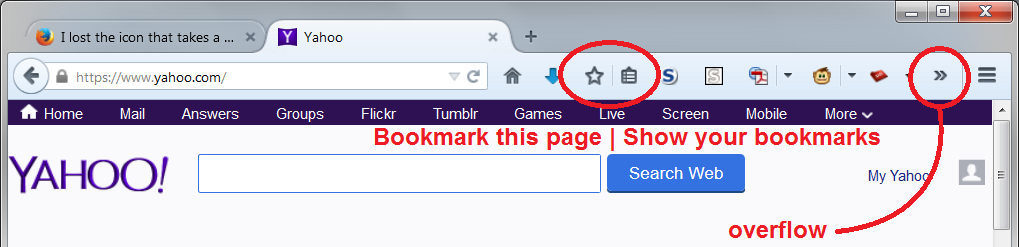
I have attached a screenshot showing what I think are the missing icons, and also the icon for "overflow" that may appear at the end of the main toolbar. Do you find the missing icons on an overflow list?
If not, they might have been moved off the toolbars or onto a different toolbar. You can try using the Customize feature to put them back in their place. This article describes how to use Customize: Customize Firefox controls, buttons and toolbars
If the icons are nowhere to be found, you can use the "Restore Defaults" button at the bottom of the customize tab to set your toolbars back to the original icons, plus some changes made by add-ons.
Any luck?
Đọc câu trả lời này trong ngữ cảnh 👍 1Tất cả các câu trả lời (6)
Giải pháp được chọn
I have attached a screenshot showing what I think are the missing icons, and also the icon for "overflow" that may appear at the end of the main toolbar. Do you find the missing icons on an overflow list?
If not, they might have been moved off the toolbars or onto a different toolbar. You can try using the Customize feature to put them back in their place. This article describes how to use Customize: Customize Firefox controls, buttons and toolbars
If the icons are nowhere to be found, you can use the "Restore Defaults" button at the bottom of the customize tab to set your toolbars back to the original icons, plus some changes made by add-ons.
Any luck?
Note that you may have removed the button(s) from the Navigation Toolbar by accident.
If you right-click a toolbar item in normal (non-customize) mode then you can remove this item from the toolbar.
- "Remove from Toolbar" will remove this item from the Navigation Toolbar and moves it to the Customize palette ("3-bar" Firefox menu button > Customize)
- "Move to Menu" will move this item to the "3-bar" Firefox menu button drop-down list
- "Move to Toolbar" in the "3-bar" Firefox menu button drop-down list will move this item to the toolbar

I was trying to move an icon from addon bar. But it pulled 2 other icons with it. First they went into the grey, right-hand column of customize window. Then everything got stuck: instead of the icons moving on the customize page, dragging them just stalled, the whole page moved. Finally I managed to push them somewhere, and they've disappeared. I've restarted FF, no change. I've looked through all my tab icons, they don't appear there.
If I Restore Defaults, does that mean I have to reinstall all my addons?
Hi maveet, the "Restore Defaults" button in the Customize tab refers to the toolbars and the graphical menu. It doesn't affect add-ons. Those are removed by the "Refresh" feature.
Hi maveet
Restore Defaults will only restore the default toolbar customization and doesn't affect installed extensions. It will move toolbar buttons to the Customize palette that weren't previously positioned on a toolbar. What happens with buttons added by an extension can be uncertain, so you will have to check the Customize palette and if necessary drag buttons back to a toolbar. Restore Defaults has an Undo action, so you can always give it a try.
Excellent! Thank you both. :-)