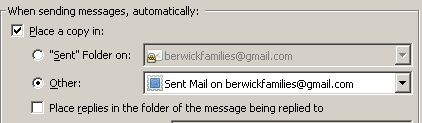
Cannot copy to sent folder.

Thunderbird has begun hanging while copying messages to the sent folder. This is a Google Business gmail account I'm working with. I've tried changing the 'copy to' setting to point to the local folder and to the IMAP folder, and I've tried compacting the sent folders and deleting tons of older emails, but I still have the problem. What's my next step?
Tất cả các câu trả lời (3)
Ah! Fantastic. That solves the issue for three of my accounts.
The remaining mail account is on HostGator. Since Gmail's spam filter is massively better than HostGator's, I've got it set up to forward all mail to a Gmail account, which I then check in Thunderbird and reply to using HostGator's SMTP so that my outbound mail goes from the proper address. Would the same technique apply with a non Gmail SMTP?
Awesomesauce. Thanks!
I don't see the point of the above answer,
I'm using Thunderbird with a Googlemail account so that I don't need to look at the web-based interface for Googlemail.
If I uncheck Save copies, it won't save a copy at all - that would be disastrous.
Why does Thunderbird sometimes refuse to save a copy ?
How do I resolve this ?