


Missing Widgets options

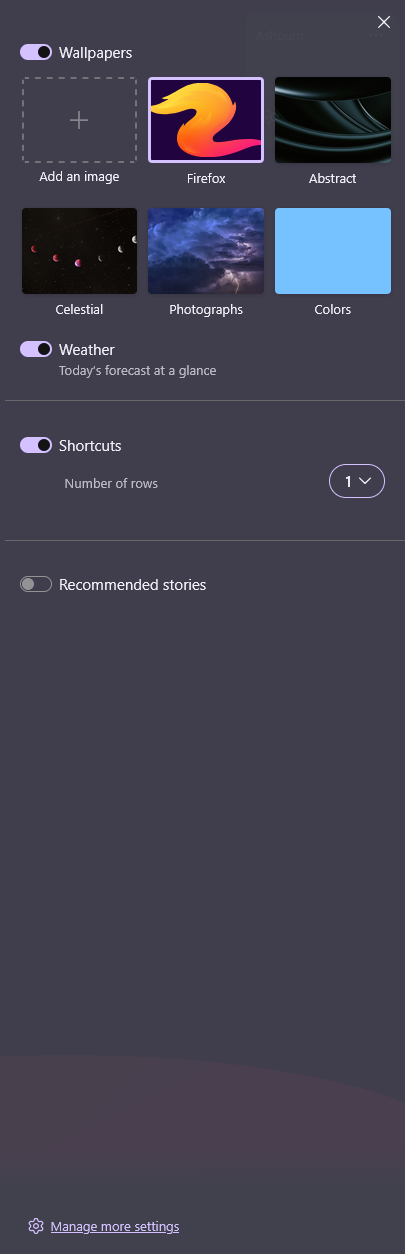
I'm trying to add the world cup tracker to my home screen, but when i click the link, it just puts me in my new tab page with no changes. When I click the pencil edit icon, widgets are not an option for me. Is there a place I need to enable them?
Krejt Përgjigjet (12)
Zgjidhja e Zgjedhur
Hi,
The link should just open the New Tab page, so that's expected. Let's focus on why you don't have the widgets available.
Could you please check whether you have "Allow Firefox to improve features, performance, and stability between updates" checked in the Firefox Settings > Permissions and data?
That worked! Thanks for your help.

I have the same problem as ftj123 and I also have the box checked for allowing firefox to improve features. Still no widget.
Hello
A similar question https://support.mozilla.org/en-US/questions/1587936 Maybe, have you restarted Firefox
Other information https://support.mozilla.org/en-US/questions/1587903#answer-1826007

KovGr said
I have the same problem as ftj123 and I also have the box checked for allowing firefox to improve features. Still no widget.
I'm in the same situation. Box is checked but still no widget. Wondering if there are some parameters in the about:config page that need to be ajusted?
Patrice-Guy Martin said
KovGr said
I have the same problem as ftj123 and I also have the box checked for allowing firefox to improve features. Still no widget.I'm in the same situation. Box is checked but still no widget. Wondering if there are some parameters in the about:config page that need to be ajusted?
Had an idea: switched the preferred language of the browser to English-Canada (it was set on French, as per my OS) and now the widgets are all available...
My widgets just disappeared right after I set Picture of the Day as my wallpaper.
Ndryshuar nga Mohammad Rafigh
Mohammad Rafigh said
My widgets just gone away right after setting picture of the day as wallpaper.
Hi Mohammad, could you please ask a new question for that?
Ndryshuar nga Denys

I have the same problem, Firefox 154.0.1 on Tahoe 26.5.2
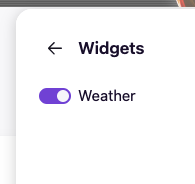
I went into browser.newtabpage.activity-stream.widgets.system.enabled and it was set to false. I set to true. Then, I was able to see an option for widgets when I clicked the pencil on a new tab. Under that, the only widget option was weather widget.
richardlanguage said
I have the same problem, Firefox 154.0.1 on Tahoe 26.5.2 I went into browser.newtabpage.activity-stream.widgets.system.enabled and it was set to false. I set to true. Then, I was able to see an option for widgets when I clicked the pencil on a new tab. Under that, the only widget option was weather widget.
Same here except I'm on macOS 26.6.2 (25G83). (I am also using the latest Firefox 154.0.1.). The issue also persists in Troubleshoot Mode using my default profile and using just a brand new profile created only to see if my profile was causing the problem.
The browser.newtabpage.activity-stream.widgets.system.enabled preference seems to default to disabled (became disabled and once enabled again would revert to disabled). Also, all widgets except for weather had been disabled as well but were interestingly meant to be enabled by default (reverted the disabled values to original enabled values). But no matter what is known to be enabled according to the browser preferences, only the Weather widget shows up and is of course fixed and not resizable and is the only widget that can be toggled on and off in the standard widget options from the new tab page.
Preferences around allowing improvements and so on in the about:preferences#permissionsData page are all good.
Were widgets maybe just for the most part hobbled for Firefox installs on macOS? This is generally new as I helped test and provide feedback for the widgets when they first began rolling out some time ago, and the widgets showed up as options and worked as expected then.
Ndryshuar nga Elegant Space Finger
Same as above — if enabling remote improvements did not turn the widgets on for you, you're not facing the same issue — please open a question of your own for visibility, as this thread has been resolved in the past already.
(No, they are supposed to work across platforms — been spinning up several new profiles a day on macOS and get them all the time — have you tried creating a separate new fresh profile just to test with a clean slate and no history of prefs to see if that has the correct defaults for you, i.e. all the widget offers there?)
jbr said
Same as above — if enabling remote improvements did not turn the widgets on for you, you're not facing the same issue — please open a question of your own for visibility, as this thread has been resolved in the past already. (No, they are supposed to work across platforms — been spinning up several new profiles a day on macOS and get them all the time — have you tried creating a separate new fresh profile just to test with a clean slate and no history of prefs to see if that has the correct defaults for you, i.e. all the widget offers there?)
I had more to time to poke around today. I set all of the following to true and I once again have the options to toggle widgets off and on. I suppose I could put in an issue for this, but these kind of issues have a habit of going nowhere. I tested again after they reappeared as options, and just dismissing them doesn't disable them in that "system" flavor set of preferences controlling options in that menu (there are non-*.service.* preferences for the profile too). Something just disabled them, and AFAIK it wasn't me and I don't have extensions installed that modify these kind of settings.
- browser.newtabpage.activity-stream.widgets.system.clocks.enabled
- browser.newtabpage.activity-stream.widgets.system.crossword.enabled
- browser.newtabpage.activity-stream.widgets.system.focusTimer.enabled
- browser.newtabpage.activity-stream.widgets.system.lists.enabled
- browser.newtabpage.activity-stream.widgets.system.pictureOfTheDay.enabled
- browser.newtabpage.activity-stream.widgets.system.sportsWidget.enabled
- browser.newtabpage.activity-stream.widgets.system.stocks.enabled
Ndryshuar nga Elegant Space Finger