


Losing focus when hold the ctrl key in Linux (firefox 57)

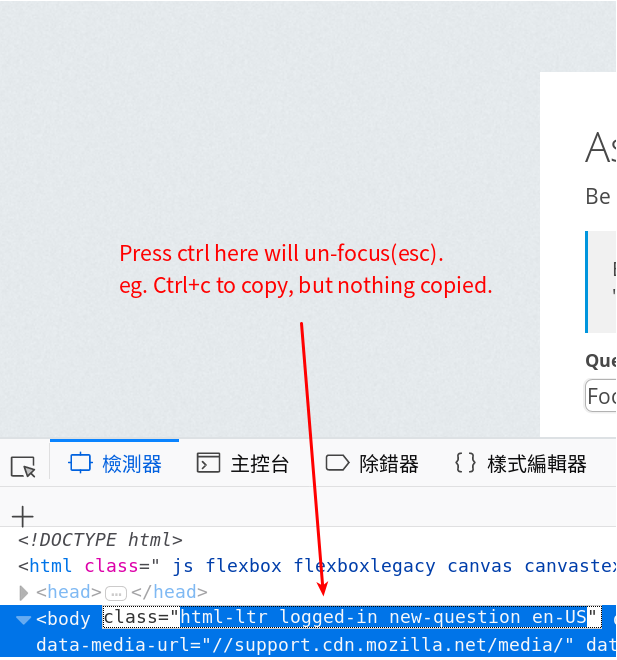
It's very annoying when I try to ctrl+v for paste something, or ctrl+c to copy something. Ctrl in Firefox deloper tool (Ubuntu 16.04) will always work like "escape" key. Even I switch to default English IME, cursor will not focus on that input selection.
It happened not only on developer tool, but also on right top plugin window. The problem can't not replicate at windows 10.
Zgjidhja e Zgjedhur
I found the problem. It's from Ubuntu / Gnome system. Problem solved by just turn off “show mouse when press Ctrl” in Ubuntu settings. Askubuntu have tutorial for how to turn off this option: https://askubuntu.com/questions/230102/how-do-i-turn-off-show-mouse-when-i-press-ctrl
Thanks for guys you spent your time support this thread.
Krejt Përgjigjet (5)
add screenshot
Try : https://support.mozilla.org/en-US/kb/troubleshoot-firefox-issues-using-safe-mode If issue stops when in Safe Mode then it is possibly a Extension and or your Profile is corrupted.
Please turn on send info to Mozilla next time before you post so can inspect your Video Card Drivers for errors.
Please let us know if this solved your issue or if need further assistance.
Thanks for reply.
Pkshadow said
Try : https://support.mozilla.org/en-US/kb/troubleshoot-firefox-issues-using-safe-mode If issue stops when in Safe Mode then it is possibly a Extension and or your Profile is corrupted.
I switch to use safe mode, but the issue still exists. Needs video or gif?
Please turn on send info to Mozilla next time before you post so can inspect your Video Card Drivers for errors.
All the checkboxes under "Firefox Data Collection and Use" is checked.
Can you at least open the right-click context menu and use that to copy and paste?
Try the Firefox version from the official Mozilla server if you currently use a version from the repositories of your Linux distribution.
Ndryshuar nga cor-el
Zgjidhja e Zgjedhur
I found the problem. It's from Ubuntu / Gnome system. Problem solved by just turn off “show mouse when press Ctrl” in Ubuntu settings. Askubuntu have tutorial for how to turn off this option: https://askubuntu.com/questions/230102/how-do-i-turn-off-show-mouse-when-i-press-ctrl
Thanks for guys you spent your time support this thread.