


Unstable browsing to certain sites

I invoke Face Book but it FB page asks me to log in. Will not accept my user and password. Also You Tube is unstable. Only when in Firefox. Other browsers are OK, I can go straight in to site on other browsers.
All Replies (5)
If you try the same using a Private Widow, is there any change?
Not sure what you mean by a "Private Window", but FB opens when I use Microsoft Edge or Avast Secure Browser.
Wondering if the behavior is the same in Private Browsing Mode: Private Browsing - Use Firefox without saving history
Oh sorry, Private Window. Have just tried that. Same response.
Can you make sure your Avast software is up to date, and possibly try turning it off for a bit as a test, if the connections improve?
In any case, restarting into Troubleshoot Mode to rule out other types of compatibility woes might also provide some comparison:
Try Firefox Troubleshoot Mode to see if the problem goes away. Firefox Troubleshoot Mode (previously known as Firefox Safe Mode) is a special diagnostic mode that temporarily turns off hardware acceleration, disables add-ons (extensions and themes) and resets some settings. See the Use Troubleshoot Mode in Firefox article for details.
If Firefox is open, you can restart in Firefox Troubleshoot Mode from the Help menu:
- Click the menu button
 , click Help, select Troubleshoot Mode and click Restart in the "Restart Firefox in Troubleshoot Mode?" dialog that opens.
If Firefox is not running, you can start Firefox in Troubleshoot Mode as follows:
- On Windows: Hold the Shift key when you open the Firefox desktop or Start menu shortcut.
- On Mac: Hold the option key while starting Firefox.
- On Linux: Quit Firefox, go to your Terminal and run firefox -safe-mode
(you may need to specify the Firefox installation path e.g. /usr/lib/firefox)
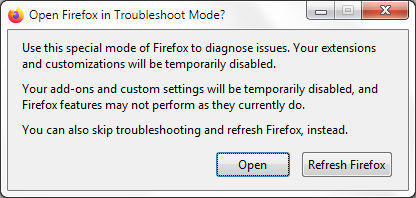
When the Firefox Troubleshoot Mode window appears, select "Open".
If the issue is not present in Firefox Troubleshoot Mode, your problem is probably caused by an extension, theme or hardware acceleration. Please follow the steps in the Troubleshoot extensions, themes and hardware acceleration issues to solve common Firefox problems article to find the cause.