


I can't delete the bookmark

I didn't have this problem before. Was there malfunction in firefox?
Chosen Solution
Thank you! This helped!
All Replies (14)
Hi Raven
What is the bookmark that you are trying to delete? Is there any error message when you try to delete it?
I tried to delete many bookmarks. It's not working at all. No error message just nothing happens.
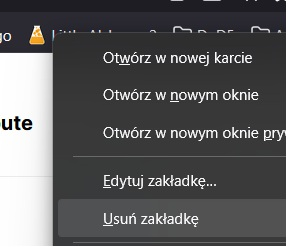
Can you delete it from within the Bookmark Manager?
No, I tried it.
If you can't add a bookmark either, Firefox may be having trouble accessing the Places database. Sometimes, this also is blamed on Sync.
As a first step, if you haven't already, please do a normal shutdown and/or restart of your system. Restarting Windows can help by freeing up locked files, completing any deferred updates, and resolving temporary file permission issues.
Any improvement?
If Firefox still has bookmark problems (unable to add or delete), could you let us know what you get when you run the "Verify Integrity" diagnosis and repair function. That's here:
Open Firefox's Troubleshooting Information page using any of these methods:
- "3-bar" menu button > Help > More Troubleshooting Information
- (menu bar) Help > More Troubleshooting Information
- type or paste about:support in the address bar and press Enter
Near the bottom, there is a section titled Places Database -- that's the file which stores history and bookmarks. Click the button labeled Verify Integrity. There may be a 10-15 second delay before results appear.
If all is well, the report that appears below the button should start with:
> Task: checkIntegrity
+ The places.sqlite database is sane
+ The favicons.sqlite database is sane
> Task: invalidateCaches
+ The caches have been invalidated
> Task: checkCoherence
+ The database is coherent
Does yours say the databases are sane, or something else? You can select and copy the report, and then paste it into a reply for review and comment.
I can add bookmark but I will not delete it after. Sorry @jscher2000 but I tried do what you writed but it just reseted mozzilla and I cant find the rest.
I found it! > Task: checkIntegrity - Unable to fix corruption, places.sqlite will be replaced on next startup > Task: checkCoherence - The task queue was cleared by an error in another task. > Task: expire - The task queue was cleared by an error in another task. > Task: vacuum - The task queue was cleared by an error in another task. > Task: stats - The task queue was cleared by an error in another task. > Task: _refreshUI - The task queue was cleared by an error in another task.
Modified by Raven
This is unfortunate:
- Unable to fix corruption, places.sqlite will be replaced on next startup
So the next time you quit and restart Firefox, it should create a fresh Places database using your last automatic bookmark backup. It won't be able to restore history, since Firefox doesn't keep backups of history.
Only I already restarted computer.
Raven said
Only I already restarted computer.
Do you mean after running Verify Integrity? The Verify Integrity report says the next time you exit/restart Firefox, it will build a new Places database. If that doesn't work, you might need to remove the file. See: Fix "The bookmarks and history system will not be functional" error message.
Chosen Solution
Thank you! This helped!
This Didn't Work For Me.
No Vegans Or Vegetarians Allowed said
This Didn't Work For Me.
Beef is getting too expensive. But I digress. Here's my updated blast on this problem. If it doesn't help, could you start a new question: https://support.mozilla.org/questions/new/firefox/form
In case this was caused by a locked file:
You can try the following:
(1) Exit/Quit Firefox and after 30 seconds or so start it back up again. This would hopefully work around any process that runs at Windows startup which might be checking the files (I'm looking at you, CCleaner and friends).
(2) For nerdier users: I found a post describing how to use Windows' Resource Monitor to try to figure out what program has opened a "handle" on the file (filter by places): https://superuser.com/a/643312
(3) Sometimes you may need to do a normal shutdown and/or restart of your system. Restarting Windows can help by freeing up locked files, completing any deferred updates, and resolving temporary file permission issues.
Check for a corrupted file:
If that didn't help, could you let us know what you get when you run the "Verify Integrity" diagnosis and repair function. That's here:
Open Firefox's Troubleshooting Information page using any of these methods:
- "3-bar" menu button > Help > More Troubleshooting Information
- (menu bar) Help > More Troubleshooting Information
- type or paste about:support in the address bar and press Enter
Near the bottom, there is a section titled Places Database -- that's the file which stores history and bookmarks. Click the button labeled Verify Integrity. There may be a 10-15 second delay before results appear.
If all is well, the report that appears below the button should start with:
> Task: checkIntegrity
+ The places.sqlite database is sane
+ The favicons.sqlite database is sane
> Task: checkCoherence
+ The database is coherent
> Task: expire
+ Database cleaned up
et cetera
Does yours say the databases are sane and coherent, or something else? You can select and copy the report, and then paste it into a reply for review and comment.

I did the following as suggested:
Near the bottom, there is a section titled Places Database -- that's the file which stores history and bookmarks. Click the button labeled Verify Integrity. There may be a 10-15 second delay before results appear.
If all is well, the report that appears below the button should start with:
> Task: checkIntegrity + The places.sqlite database is sane + The favicons.sqlite database is sane > Task: invalidateCaches + The caches have been invalidated > Task: checkCoherence + The database is coherent
Integrity was not good - clicked restore or whatever it said to do, restarted PC, all bookmarks GONE!!!!
How do I get them back???