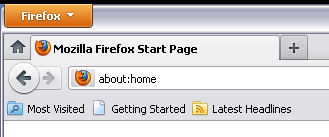
How the hell do I get to my bookmarks? No, there is no "Firefox button" that I can see to follow your How To instructions. Am I stupid or something?

You have taken my bookmarks button away. You answer a question about how to get to my bookmarks. That answer is "Click on the Firefox button, etc." I have tried clicking on every spot that looks like anything the opening Firefox page, but I can find no "Firebox button"! Can you please explain to an idiot like me where this button is and what it looks like?
Bookmarks are absolutely key. I do not understand why you couldn't have preserved a bookmark button and not force us to dig for it.
Sheesh.
Todas as respostas (1)
Upper-left corner of the browser window - see the image below. There is also a blue button with a white star for accessing your Bookmarks, on the right-side of the toolbars - on either the Bookmarks Toolbar, or if that is hidden, on the Navigation Toolbar.
If you don't see the Firefox button, the Menu Bar is probably selected to appear. In that case your should have Bookmarks showing on the Menu Bar.