


Web form autofill not working

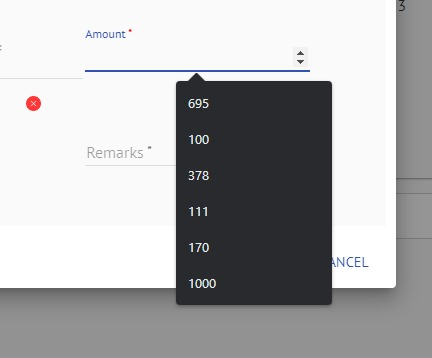
when using my employer's CRM web app on Chrome, while entering data in various fields, it shows me suggestions based on past entries. how can I do this in Firefox as well, by default Firefox doesn't show any suggestions. I have attached an image for reference. Any help would be appreciated.
Additonal Info: Setting > Privacy & Security > History > Use custom settings for history>"Remember browsing and download history" ---> is enabled
Setting > Privacy & Security > History > Use custom settings for history>"Remember search and form history"--- is enabled
Thanks in advance
PS: Attached image is the of the feature at work in chrome
Diubah oleh Anurag
All Replies (2)
Hi
This support article should help:
https://support.mozilla.org/en-US/kb/control-whether-firefox-automatically-fills-forms
Hi paul, thankyou for your response. The above article doesn't help me as i mentioned above, i already have those settings turned on.