


How do I prevent bookmarks (Library) from appearing on every website page I visit?
The library takes the "focus" and blocks the view of everything I am trying to look at on the web page. I am using Windows 7 , Firefox 25.0 "Up to date".
Chosen Solution
To disable protected mode you either edit or create a configuration file in the Flash folder under C:\Windows. The folder where you make the edit depends on whether your Windows 7 is 32-bit or 64-bit. Maybe this will help.
(1) In a My Computer or Windows Explorer window, open this folder:
C:\Windows\SysWOW64\Macromed\Flash
If that folder does not exist, then you are using 32-bit Windows, and you can open the following folder instead:
C:\Windows\System32\Macromed\Flash
(Note: This folder exists on both 32-bit and 64-bit Windows, but on 64-bit Windows Firefox uses the Flash player in the SysWOW64 folder instead.)
(2) Check for a file named mms.cfg:
(A) If mms.cfg exists, drag it to your Documents folder where you can edit it without being bothered about administrator privileges
(B) If mms.cfg does not exist, open your Documents folder, right-click > New > Text File and name the new file mms.cfg
(3) Open mms.cfg from Documents into a text editor such as Notepad. Add this on its own line (I put it last):
ProtectedMode=0
Save the file and close Notepad.
(4) Hold down the Ctrl key and drag the mms.cfg file back to the Flash folder to make a copy there, keeping the original in Documents
This change should take effect the next time you restart Firefox.
Hopefully that's a little clearer than Adobe's instructions. (??)
എല്ലാ മറുപടികളും (6)
To rule out a problem with the Flash Player protected mode, could you disable it? This thread has a further description of the problem of Flash switching the window order: Opening New Windows and Shockwave Flash.
Can you attach a screenshot?
- http://en.wikipedia.org/wiki/Screenshot
- https://support.mozilla.org/kb/how-do-i-create-screenshot-my-problem
Use a compressed image type like PNG or JPG to save the screenshot.
Do you mean the bookmarks sidebar?
- Toggle the Bookmarks sidebar on/off via "View > Sidebar > Bookmarks" or Ctrl+B (Command+B on Mac)
- Toggle the History sidebar on/off via "View > Sidebar > History" or Ctrl+H (Command+H on Mac)
jscher2000: Thanks for your reply, it is appreciated. Turning off Shockwave seems to have solved the problem, but I suspect that Shockwave was there for a reason. I will follow the link you provided to read more about it.
cor-el:
Here is a screen shot. It appears to be Shockwave related. No, it is not thesidebar.
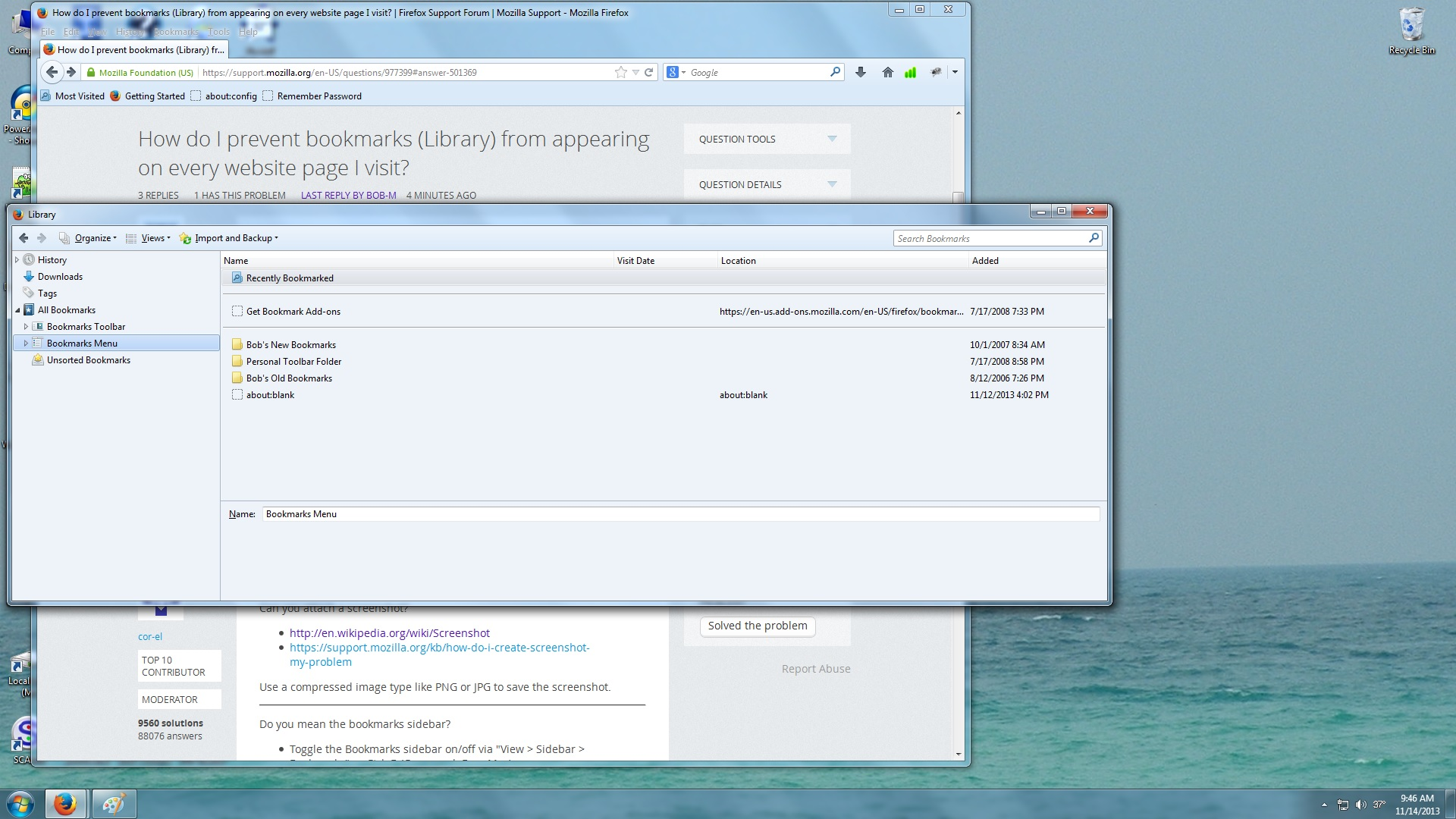
My old Shockwave version was 11.7.700.202
I just d/l 11.9.900.152. It has the same problem. Guess I need to work on it some more. How do I enable or disable protected mode? I did not see an option for that.
Chosen Solution
To disable protected mode you either edit or create a configuration file in the Flash folder under C:\Windows. The folder where you make the edit depends on whether your Windows 7 is 32-bit or 64-bit. Maybe this will help.
(1) In a My Computer or Windows Explorer window, open this folder:
C:\Windows\SysWOW64\Macromed\Flash
If that folder does not exist, then you are using 32-bit Windows, and you can open the following folder instead:
C:\Windows\System32\Macromed\Flash
(Note: This folder exists on both 32-bit and 64-bit Windows, but on 64-bit Windows Firefox uses the Flash player in the SysWOW64 folder instead.)
(2) Check for a file named mms.cfg:
(A) If mms.cfg exists, drag it to your Documents folder where you can edit it without being bothered about administrator privileges
(B) If mms.cfg does not exist, open your Documents folder, right-click > New > Text File and name the new file mms.cfg
(3) Open mms.cfg from Documents into a text editor such as Notepad. Add this on its own line (I put it last):
ProtectedMode=0
Save the file and close Notepad.
(4) Hold down the Ctrl key and drag the mms.cfg file back to the Flash folder to make a copy there, keeping the original in Documents
This change should take effect the next time you restart Firefox.
Hopefully that's a little clearer than Adobe's instructions. (??)