


Firefox Side Bar Ai Chat Bots

When using ANY side bar ai chat bot, my microphone doesnt work. When i speak it just doesnt record the sounds.
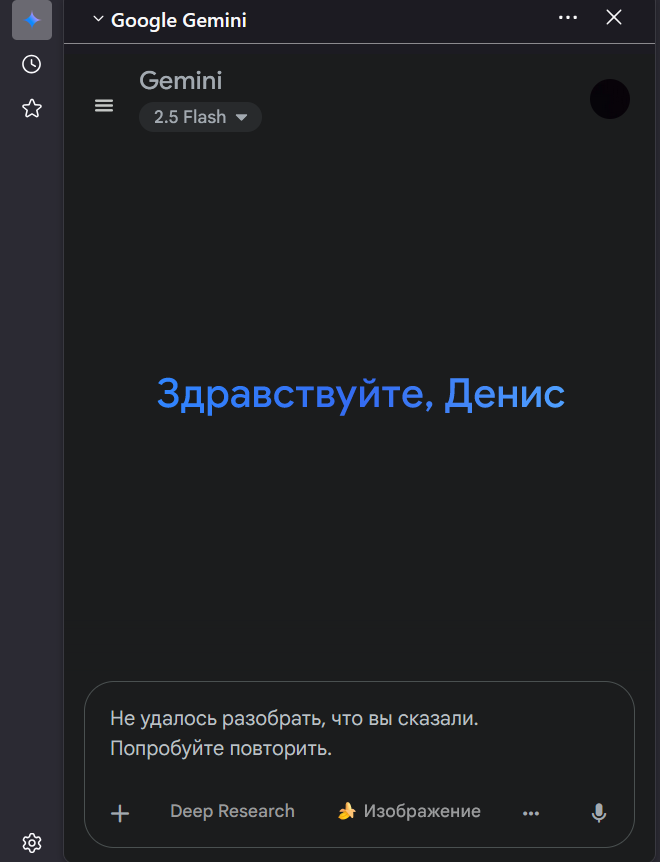
Chosen solution
Hi again,
The issue should now be fixed in Firefox 144, which is in Beta. This version's release is scheduled for October 14.
Read this answer in context 👍 1എല്ലാ മറുപടികളും (6)
Hi,
Thank you for reaching out! I've filed a bug report on that: https://bugzilla.mozilla.org/show_bug.cgi?id=1991316
Hi,
The issue is currently fixed in Firefox 145, which is in Nightly. This version's release is scheduled for November 11.
Chosen Solution
Hi again,
The issue should now be fixed in Firefox 144, which is in Beta. This version's release is scheduled for October 14.
Firefox 144 has been released, and the bug is indeed (partially) fixed. Currently you need to first give your chatbot a persistent permission to use microphone (e.g. open it in a regular tab, try to start recording, and in the Firefox prompt asking for permission check "Remember for all microphones" and click Allow).
I've also filed a new bug to track the remaining part of the issue: https://bugzilla.mozilla.org/show_bug.cgi?id=1994223
Just to keep you updated, this issue has already been tracked as bug 1982956 (I'm still too bad at searching for bugs...) I'm not sure if it's being actively worked on, though.