


Address book primer?

My contacts are a hot mess. For fear of destruction, I have not done any housekeeping. I feel like in past, my elementary trial and error tests have yielded inconsistent results. (It could be my brain that yields inconsistent results.) e.g. Add or delete a test contact on either side, seems to end up confusing me more! I'd love to read about sync priorities or settings yet seems like all I can find is Q&A forums or a download for a printable PDF that is reputedly maybe out of date...
☺Is there a basic, extended primer on how address books and syncing work with TB?
My: "Personal Address Book" has 9K+ entries, yet the google contacts that seems to reside in "Address Book" has only 4K+, which matches my contacts on google site.
I want to begin the arduous process of deleting "duplicates", many of which seem to be not really identical, and I need to ascertain what is current...
But where to start? My fear is if I go to contacts.google.com and do a ton of culling, that at the next sync everything that I deleted will be restored by TB.
Another concern is android syncing to google but I suppose that's another forum. I use Bluemail currently...I just got used to it. I think I finally got past the issues with "phone storage" vs "Google storage" and then I finally realized that linking my phone to 2 separate google accounts wasn't helping.☺
Should I switch to Thunderbird Mobile? Does it sync nicely with android/google? Is every different phone going to behave differently?
TIA and forgive my ignorance.
Chosen solution
I have 3 address books: Personal Address Book Address Book Collected Addresses.
So you have no obvious synced Google address book. Personal Address Book and Collected Addresses are standard address books. The entry "Address Book" is a ringer and I have no idea where i comes from. Perhaps it is a syncronised address book with a Google account. The one I have for Google has that name. Although other providers have more descriptive names like the name of the provider at least like "GMX.COM address book".
I suggest you right click the entry in the address book and through properties check what provider it linked to. Perhaps change the name to something more descriptive while you are there.
If you have no synced address book do the following;
Open your address book tab
Click the add address book icon and select CardDAV from the menu
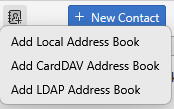 Enter your gmail username (if it has @gmail heave the location blank and continue.
1. Can I change the default address book sync to google?No. you can only rename it
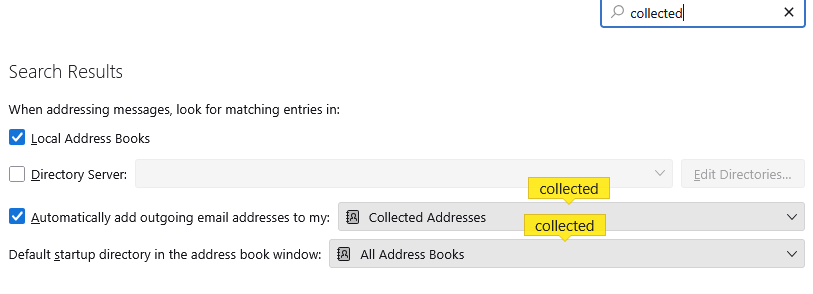
2. Can I change settings for automatically saved (collected) addresses to save to default address book instead of a separate "collected" folder?
That is in settings. (I searched on collected)
3. IOW can I just make it all one single address book?
No, synchronization is per address book and you can not synchronize your personal address book. It is for this reason Thunderbird has an ALL address books search folder that just drops everything into a single place. All address books is a virtual book. It does not exist in a physical file as such and is genersated on the fly on access. Just as Thunderbird virtual mail folders work. You can choose not to add anything to the personal address book (PAB), but you can not remove it. However you say you already have some 14,000 entries in there, so it is probably a but late to do much with it at all.
4. Is there documentation somewhere tells me details about priority/hierarchy of syncing to google i.e. Which side takes precedence? ...No not really. But you appear to be assuming you will have edited the same address record both at Google and in Thunderbird in the last 30 minutes since the last sync. I would think that would be exceedingly rare even doing what you are expressing as your project.
5. Should I start the long process of culling in google contacts, or should I do it in TB?
Your choice, but as the TB contacts you currently have are primarily not going to be syncronised ("address book" being the only likely one. I would think doing anything in Googlres interface would be very counter productive. Perhaps start by copying anything you want to keep to yet another address book from the Thunderbird Personal Address Book and then deleting everything in the Thunderbird PAB. That will not help with the duplicates between Google and your local PAB, or the "want to keep" address book.
You might try looking at your contacts in Thunderbird with the "all address books selected and also with the address book title showing in the details list then you could delete one of each shown duplicate pair giving precedence to the Google address book as it is syncronised and deleting from the other local books.

The little square icon on the far right of the image allows you to customise the hadings shown so you can add the address book name to the list.
Note this rather well. Phone contacts are what phones synchronize to places like google. They reliably have have phone numbers, but an email address is not in anyway guaranteed, or even likely in many cases. In the case of my phone contacts anything but a name and phone number is actually quite rare. So you are probably going to have issues with contacts synchronized from your phone to google that have no email and you will need to edit those to add an email address before you delete the records from Thunderbird address books that contain their email address.
I am not aware of any reliable way to merge disparate date like phone contacts and email address books that is not a load of manual decision making. This is a mammoth task you have set yourself.
Read this answer in context 👍 0എല്ലാ മറുപടികളും (4)
It may prove helpful to document what addressbooks you have. For example, you have a Thunderbird addressbook on your PC that is updated when you rightclick on emails to add them. If you have set Thunderbird to collect addresss for those to whom you send email, that will be an additional addressbook, and you mentioned that you have a gmail addressbook. Are there others? Each addressbook appears in the addressbook pane on the left side.
Now, the addressbooks on your PC (the default Thunderbird one, plus the collected address one) do NOT sync - and they are NOT accessible from your phone. They are updated only when you add or remove entries. The gmail addressbook is sync'd from your setting. (Cllick the three dots to the right of the addressbook and the synchronize option appears). The gmail account view within Thunderbird reflects whatever changes you make to that addressbook. You may find that many of your duplicates appear because there is an entry in the gmail addressbook and also in the Thunderbird one.
Thank you David,
I actually knew all that, but I also am lazy and terribly disorganized and almost never get around to learning the right way to do stuff. (ADHD head) So in fact, My default TB address book has dupes and trips because at least once I downloaded google contacts CSV and imported it to TB. (Back when Google didn't sync as well as it now seems to.)
I didn't ask my question(s) well. I have 3 address books:
  Personal Address Book
  Address Book
  Collected Addresses.
I have no desire to separate them, if I have a choice. I want the simplest thing possible. I want to know if there are settings that I can mod, (including in the very dangerous config editor), that would help me simplify-make it all one.
1. Can I change the default address book sync to google? 2. Can I change settings for automatically saved (collected) addresses to save to default address book instead of a separate "collected" folder? 3. IOW can I just make it all one single address book?
(I understand that if the answer is no, then I can still import/export to do a one time "snapshot" from either to the other, but then I gotta remember forever what I did...)
4. Is there documentation somewhere tells me details about priority/hierarchy of syncing to google i.e. Which side takes precedence? ...
5. Should I start the long process of culling in google contacts, or should I do it in TB? ...I don't want to have all my hard work ruined by being automatically overwritten with a thousand contacts that I just deleted.☺
Thanks a lot,
Chosen Solution
I have 3 address books: Personal Address Book Address Book Collected Addresses.
So you have no obvious synced Google address book. Personal Address Book and Collected Addresses are standard address books. The entry "Address Book" is a ringer and I have no idea where i comes from. Perhaps it is a syncronised address book with a Google account. The one I have for Google has that name. Although other providers have more descriptive names like the name of the provider at least like "GMX.COM address book".
I suggest you right click the entry in the address book and through properties check what provider it linked to. Perhaps change the name to something more descriptive while you are there.
If you have no synced address book do the following;
Open your address book tab
Click the add address book icon and select CardDAV from the menu
Enter your gmail username (if it has @gmail heave the location blank and continue.
1. Can I change the default address book sync to google?No. you can only rename it
2. Can I change settings for automatically saved (collected) addresses to save to default address book instead of a separate "collected" folder?
That is in settings. (I searched on collected)
3. IOW can I just make it all one single address book?
No, synchronization is per address book and you can not synchronize your personal address book. It is for this reason Thunderbird has an ALL address books search folder that just drops everything into a single place. All address books is a virtual book. It does not exist in a physical file as such and is genersated on the fly on access. Just as Thunderbird virtual mail folders work. You can choose not to add anything to the personal address book (PAB), but you can not remove it. However you say you already have some 14,000 entries in there, so it is probably a but late to do much with it at all.
4. Is there documentation somewhere tells me details about priority/hierarchy of syncing to google i.e. Which side takes precedence? ...No not really. But you appear to be assuming you will have edited the same address record both at Google and in Thunderbird in the last 30 minutes since the last sync. I would think that would be exceedingly rare even doing what you are expressing as your project.
5. Should I start the long process of culling in google contacts, or should I do it in TB?
Your choice, but as the TB contacts you currently have are primarily not going to be syncronised ("address book" being the only likely one. I would think doing anything in Googlres interface would be very counter productive. Perhaps start by copying anything you want to keep to yet another address book from the Thunderbird Personal Address Book and then deleting everything in the Thunderbird PAB. That will not help with the duplicates between Google and your local PAB, or the "want to keep" address book.
You might try looking at your contacts in Thunderbird with the "all address books selected and also with the address book title showing in the details list then you could delete one of each shown duplicate pair giving precedence to the Google address book as it is syncronised and deleting from the other local books.
The little square icon on the far right of the image allows you to customise the hadings shown so you can add the address book name to the list.
Note this rather well. Phone contacts are what phones synchronize to places like google. They reliably have have phone numbers, but an email address is not in anyway guaranteed, or even likely in many cases. In the case of my phone contacts anything but a name and phone number is actually quite rare. So you are probably going to have issues with contacts synchronized from your phone to google that have no email and you will need to edit those to add an email address before you delete the records from Thunderbird address books that contain their email address.
I am not aware of any reliable way to merge disparate date like phone contacts and email address books that is not a load of manual decision making. This is a mammoth task you have set yourself.
Matt: Thank You!!!
Yes, "Address Book" is synced to Google but now it's name is "Google Address Book". I really appreciate your time and help.