


How can i change the order of Search Bar suggestions?
Hi everyone,
I would like to change the order of Search Bar suggestions, if possible, because I find the "Firefox Suggest" section's results more relevant to what I usually look for.
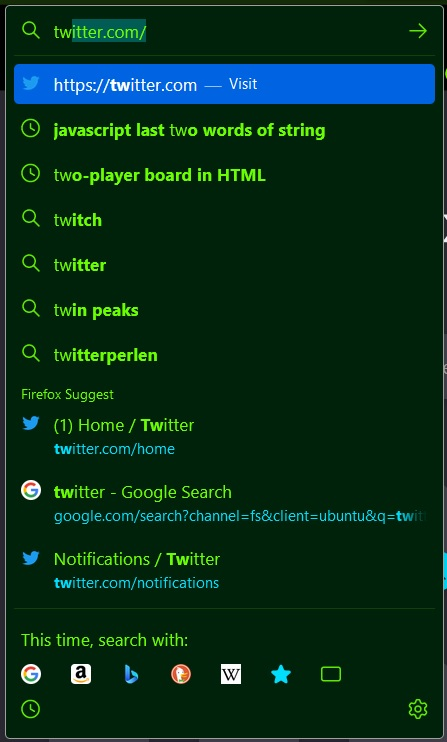
Specifically, as shown in the image I attach, when I type, I get some suggestions, and then I can see the "Firefox Suggest" section. Is it possible to change the order and place it above the suggestions?
Thank you!
Hi everyone,
I would like to change the order of Search Bar suggestions, if possible, because I find the "Firefox Suggest" section's results more relevant to what I usually look for.
Specifically, as shown in the image I attach, when I type, I get some suggestions, and then I can see the "Firefox Suggest" section. Is it possible to change the order and place it above the suggestions?
Thank you!
Chosen solution
Go to Settings -> Search and turn off Show search suggestions ahead of browsing history in address bar results.
Read this answer in context 👍 2എല്ലാ മറുപടികളും (1)
Chosen Solution
Go to Settings -> Search and turn off Show search suggestions ahead of browsing history in address bar results.