

Questa discussione è archiviata.
Inserire una nuova richiesta se occorre aiuto.

Archiviato
Can't delete languages used to display menus, messages and notifications from Firefox

I can't delete languages used to display menus, messages and notifications from Firefox.
Mozilla/5.0 (Windows NT 10.0; Win64; x64; rv:77.0) Gecko/20100101 Firefox/77.0
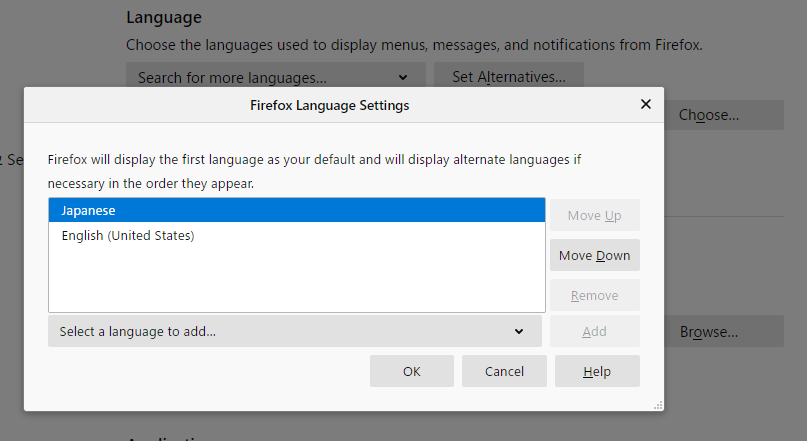
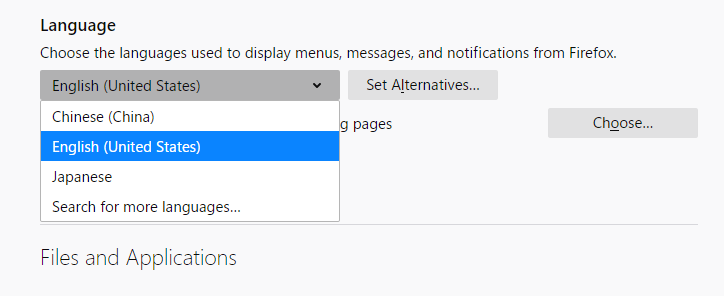
I installed the Chinese UI and removed it, but it doesn't really delete it. As you can see in the images of about:preferences#general, it disappears in the popup for adding and deleting languages, but it remains in the screen to improve the language. Then you can switch to Chinese UI and restart. How can I really delete it?
I can't delete languages used to display menus, messages and notifications from Firefox.
Mozilla/5.0 (Windows NT 10.0; Win64; x64; rv:77.0) Gecko/20100101 Firefox/77.0
I installed the Chinese UI and removed it, but it doesn't really delete it. As you can see in the images of about:preferences#general, it disappears in the popup for adding and deleting languages, but it remains in the screen to improve the language. Then you can switch to Chinese UI and restart. How can I really delete it?
Tutte le risposte (1)
What basic Firefox locale are you using ?
You should see installed additional language packs via about:addons
- Add-ons -> Languages"
Note that you can only remove languages installed via a language pack and not the default language, the same for languages used for web pages.