


Buttons not loading properly.

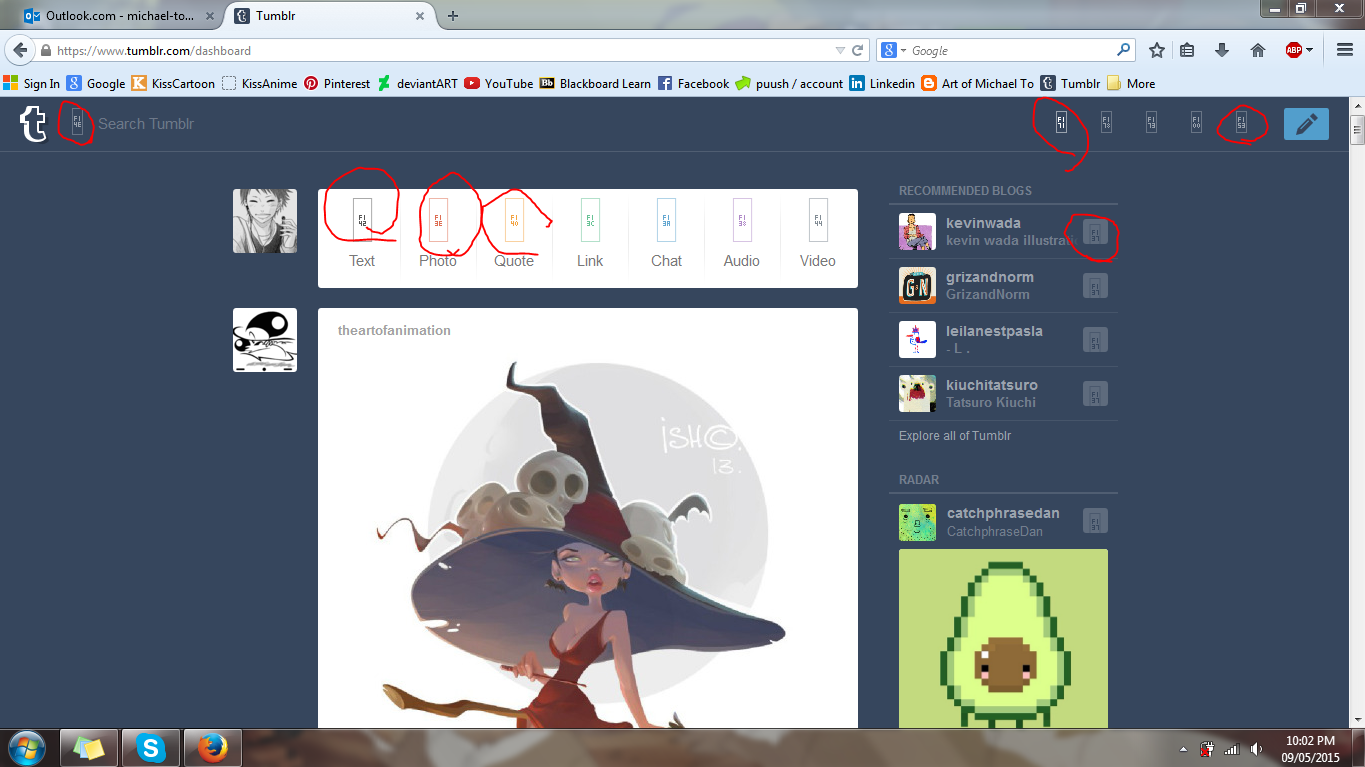
The buttons on Tumblr.com are not loading properly. This includes the video player's buttons as well. I've only noticed this problem on this specific webpage. Here is a screenshot of the problem.
Soluzione scelta
Missing icons are usually supplied by a font that is downloaded from the server (@font-face) as you might see by little boxes that show the hex code of the characters instead. If you have a font installed that covers this Unicode range then you may see a real (CJK) character and not the little box with the CSS code.
Make sure that you allow pages to choose their own fonts.
- Tools > Options > Content : Fonts & Colors > Advanced: [X] "Allow pages to choose their own fonts, instead of my selections above"
You can check the gfx.downloadable_fonts.enabled pref on the about:config page and make sure that it is set to true (if necessary double-click the line to toggle its value).
Leggere questa risposta nel contesto 👍 0Tutte le risposte (1)
Soluzione scelta
Missing icons are usually supplied by a font that is downloaded from the server (@font-face) as you might see by little boxes that show the hex code of the characters instead. If you have a font installed that covers this Unicode range then you may see a real (CJK) character and not the little box with the CSS code.
Make sure that you allow pages to choose their own fonts.
- Tools > Options > Content : Fonts & Colors > Advanced: [X] "Allow pages to choose their own fonts, instead of my selections above"
You can check the gfx.downloadable_fonts.enabled pref on the about:config page and make sure that it is set to true (if necessary double-click the line to toggle its value).