Videos won't play in Facebook

I recently upgraded my Windows 7 laptop to Windows 10. Now in Facebook, videos won't play. I am using the latest Firefox and Flash player. The picture for the video shows up, but when I press play, it turns to a blur and won't play. I restarted Firefox in safe mode and the videos play normally, so it is an add-on causing the issue. I have disable each add-on, but can't seem to find the culprit. Maybe iI am not fully disabling them?
This raises another question...do I still need Flash Player at all? Do browsers now have other ways to play the videos?
Thanks in advance
Επιλεγμένη λύση
You can try to disable hardware acceleration in Firefox.
- Options/Preferences -> General: Performance
remove checkmark: [ ] "Use recommended performance settings"
remove checkmark: [ ] "Use hardware acceleration when available" - https://support.mozilla.org/en-US/kb/performance-settings
Close and restart Firefox after modifying the setting for changes to take effect.
You can check if there is an update for your graphics display driver and check for hardware acceleration related issues.
If it works in Safe Mode and in normal mode with all extensions ("3-bar" menu button or Tools -> Add-ons -> Extensions) disabled then try to find which extension is causing the problem by enabling one extension at a time until the problem reappears.
Close and restart Firefox after each change via one of these:
- "3-bar" menu button -> Exit (Power button)
- Windows: File -> Exit
- Mac: Firefox -> Quit Firefox
- Linux: File -> Quit
Όλες οι απαντήσεις (4)
I just uninstalled Flash and tried to use Firefox without it with no luck...also cleared the cache and facebook cookie...no luck. Also reinstalled Flash with no luck. Also uninstalled and reinstalled Firefox with no luck.
Τροποποιήθηκε στις από τον/την sdodell
Επιλεγμένη λύση
You can try to disable hardware acceleration in Firefox.
- Options/Preferences -> General: Performance
remove checkmark: [ ] "Use recommended performance settings"
remove checkmark: [ ] "Use hardware acceleration when available" - https://support.mozilla.org/en-US/kb/performance-settings
Close and restart Firefox after modifying the setting for changes to take effect.
You can check if there is an update for your graphics display driver and check for hardware acceleration related issues.
If it works in Safe Mode and in normal mode with all extensions ("3-bar" menu button or Tools -> Add-ons -> Extensions) disabled then try to find which extension is causing the problem by enabling one extension at a time until the problem reappears.
Close and restart Firefox after each change via one of these:
- "3-bar" menu button -> Exit (Power button)
- Windows: File -> Exit
- Mac: Firefox -> Quit Firefox
- Linux: File -> Quit
Thanks Cor-el...this has virtually solved the issue! Only one video out of about 30 didn't play after I changed the setting.
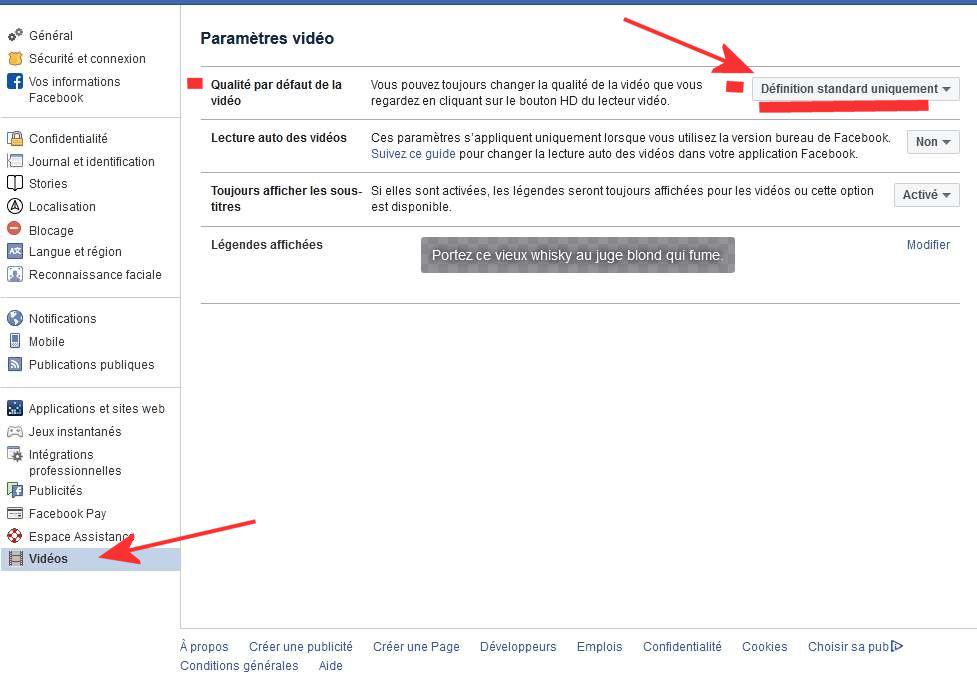
I had this issue too. After lots of research I've found the solution. Actually, Firefox has nothing to do with that problem. You mus open Facebook, go to Options/settings and in the left panel scroll until "VIDEOS" click on it. Than in the right panel "UNCHECK" H.D. video quality (by default) and Choose: "STANDARD QUALITY ONLY" .Voilà. All videos are playing perfectly.