


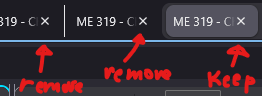
Remove the X from the tabs when not selected

I LOVE y'alls new splitscreen feature, BUT I also noticed ya'll put the X on the tabs so that at any time even if unselected, you can close it; Is there any way to make that x appear only when selected because the main reason I used firefox in the past was because middle click was it's own dedicated way to close tabs making selected tabs literally careless and SIGNIFIGANTLY time efficient, but now that that x is on the tab at all times, it gets in the way and IT'S MAKING ME CLOSE ALL MY SPLIT TABS. Please, as a loyal firefox user, with either tell me how to remove the x's or please make it an official option to have them off. Thank you for your time.
Wšykne wótegrona (1)
Hello
A space for users to give product feedback https://support.mozilla.org/en-US/kb/what-mozilla-connect
Maybe https://www.reddit.com/r/FirefoxCSS/comments/1f66tpe/remove_close_x_button_on_inactive_tabs_except_on With the help of userChrome.css https://www.youtube.com/watch?v=U5r7QT5y_yg
Wót Agent virtuel změnjony