


Windows 10 reached EOS (end of support) on October 14, 2025. If you are on Windows 10, see this article.

Hilfe durchsuchen

Vorsicht vor Support-Betrug: Wir fordern Sie niemals auf, eine Telefonnummer anzurufen, eine SMS an eine Telefonnummer zu senden oder persönliche Daten preiszugeben. Bitte melden Sie verdächtige Aktivitäten über die Funktion „Missbrauch melden“.

Weitere Informationen
Offen

Firefox on Linux renders some ChatGPT emoji as monochrome outlines

Buckaroobanjo

I have reproduced a persistent Firefox/Linux emoji rendering issue in ChatGPT and found a small CSS workaround that fixes it.

Environment

Linux Firefox 155.0.1 The problem also reproduces in a completely fresh Firefox profile Noto Color Emoji is installed

Symptoms

In normal ChatGPT conversation text, some common emoji such as:

😄 😂 😀 😁 🙂 😊 🤣 ✅

render as monochrome or outline glyphs.

Other emoji such as:

🚀 🔥 ❤

may render correctly in the same message.

A particularly useful clue is that the same affected emoji render correctly inside ChatGPT code/copy boxes, while failing in ordinary response body text.

Firefox DevTools Fonts inspection showed ordinary fallback fonts including DejaVu Sans, FreeSans and Nimbus Sans being used alongside Noto Color Emoji.

Updating Firefox from 155.0 to 155.0.1 did not fix it, and neither did creating a completely fresh Firefox profile.

Diagnostic test

Running this in Firefox DevTools Console on chatgpt.com immediately fixes the affected emoji throughout the page:

document.documentElement.style.setProperty(

 "font-variant-emoji",
 "emoji",
 "important"

)

Permanent workaround

Using the Stylus extension, scoped only to chatgpt.com:

html {

   font-variant-emoji: emoji !important;

}

This survives a complete Firefox restart.

This appears to be a font/emoji-presentation interaction where some emoji-capable Unicode characters are being satisfied by ordinary monochrome text fonts before the colour emoji font is selected.

Mozilla Bug 1971053 describes closely related glyph-selection behaviour and mentions font-variant-emoji: emoji as a remedy: https://bugzilla.mozilla.org/show_bug.cgi?id=1971053

I am posting this both in case it helps other Linux/Firefox users and to ask whether this remaining behaviour on Firefox 155.0.1 is expected or should be tracked as a current Firefox/web-compatibility issue.
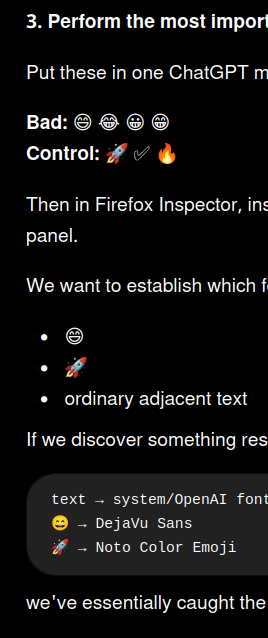
I have reproduced a persistent Firefox/Linux emoji rendering issue in ChatGPT and found a small CSS workaround that fixes it. Environment Linux Firefox 155.0.1 The problem also reproduces in a completely fresh Firefox profile Noto Color Emoji is installed Symptoms In normal ChatGPT conversation text, some common emoji such as: 😄 😂 😀 😁 🙂 😊 🤣 ✅ render as monochrome or outline glyphs. Other emoji such as: 🚀 🔥 ❤️ may render correctly in the same message. A particularly useful clue is that the same affected emoji render correctly inside ChatGPT code/copy boxes, while failing in ordinary response body text. Firefox DevTools Fonts inspection showed ordinary fallback fonts including DejaVu Sans, FreeSans and Nimbus Sans being used alongside Noto Color Emoji. Updating Firefox from 155.0 to 155.0.1 did not fix it, and neither did creating a completely fresh Firefox profile. Diagnostic test Running this in Firefox DevTools Console on chatgpt.com immediately fixes the affected emoji throughout the page: document.documentElement.style.setProperty( "font-variant-emoji", "emoji", "important" ) Permanent workaround Using the Stylus extension, scoped only to chatgpt.com: html { font-variant-emoji: emoji !important; } This survives a complete Firefox restart. This appears to be a font/emoji-presentation interaction where some emoji-capable Unicode characters are being satisfied by ordinary monochrome text fonts before the colour emoji font is selected. Mozilla Bug 1971053 describes closely related glyph-selection behaviour and mentions font-variant-emoji: emoji as a remedy: https://bugzilla.mozilla.org/show_bug.cgi?id=1971053 I am posting this both in case it helps other Linux/Firefox users and to ask whether this remaining behaviour on Firefox 155.0.1 is expected or should be tracked as a current Firefox/web-compatibility issue.
Angefügte Screenshots

Alle Antworten (1)

Update: The original workaround using font-variant-emoji: emoji was too aggressive and caused ordinary digits to render using emoji presentation. The better fix is:

html {

   font-variant-emoji: unicode !important;

}

This keeps ordinary numbers as normal text while retaining full-colour rendering for the affected emoji.

Stellen Sie eine Frage

Sie müssen sich mit Ihrem Benutzerkonto anmelden, um auf Beiträge zu antworten. Bitte stellen Sie eine neue Frage, wenn Sie noch kein Benutzerkonto haben.