


Adding items to the files & attachment section

Hi,
I use Thunderbird 152.0.1 (64-Bit) and I only have three items in the files & attachment section of general settings (JPG, PDF, Excel). How can I add more items, for other file types? Is there an easy way to do this or does this mean I have to deep dive into the configuration of Thunderbird?
And would it be possible to add an item to declare that website links in e-mails have to be opened with Firefox in private mode, which is not the standard browser on my machine?
Thx!
Alle svar (2)

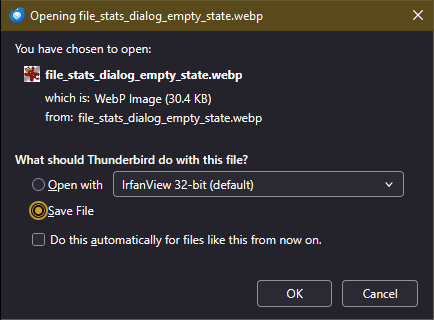
Re. the first part... If you're sent an attachment that's not already listed among the known file types. when you attempt to open it you'll be presented with a dialog box (see the attached image) asking whether whether you want to Save it or Open with a program. After that it will appear in the Files & Attachment list (not sure but I think it won't show until you restart Thunderbird.)
Re. the second part... I see that it's been discussed here before, but I don't find a definitive answer. I did find this discussion on another forum that clams to have a solution that does involve some deep diving. I can't vouch for how well it works, or even if it works:
https://superuser.com/questions/1775149/open-links-from-thunderbird-with-non-default-browser
Valgt løsning
Hi Lin, great tips! Thanks alot! It works (for me)!
I did the following:
- Open Settings/General/Configuration (at the bottom of the page)
- Search for network.protocol-handler.warn-external.http and network.protocol-handler.warn-external.https
- Toggle both to true
- Click on a link in a mail
- Open Settings (again), scroll down to Files & Attachments list
- Search and select Firefox private browsing app for new http/https list entry
Done! Click again on a link in a mail - Firefox opens the page in private mode