


US English Rules OK (not actually)

Firefox updated itself recently (150.0.1) 64-bit Windows and since then we have US English and our other languages 'Real' English ;-) French and Greek disappeared. We reinstalled them but - sorry about this guys - we would like to remove US English please. I followed some advice from Google but couldn't locate the US-English Dictionary.
Valgt løsning
You can't remove the language that is the currently installed Firefox locale, so it looks that you have installed the US-English Firefox version. You would have to uninstall this version and remove language packs that you may have installed.
Download and install the Firefox version that you want as the default. download
For spell checking you need a dictionary and not a language pack.
You can look here for dictionaries: dictionaries
Don't forget to backup your data.
Alle svar (6)
Hi
To remove US English language
- Go to Menu > Settings > General, scroll down to Language and Appearance.
- Under Language, click Set Alternatives.
- Move English (United Kingdom), French, and Greek to the top of the list.
- Select English (United States) and click Remove.
- Restart Firefox.
To remove US-English Dictionaries
Go to about:addons (Menu > Extensions & Themes > Dictionaries > Three dots > Remove)
Hi George and Thanks. Unfortunately US-English appears to be deeply attached to my computer and won't go away! Please see attachment. Jon
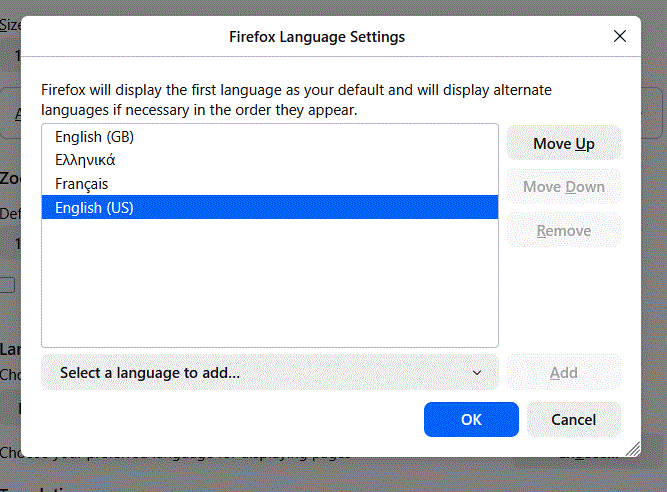
Valgt løsning
You can't remove the language that is the currently installed Firefox locale, so it looks that you have installed the US-English Firefox version. You would have to uninstall this version and remove language packs that you may have installed.
Download and install the Firefox version that you want as the default. download
For spell checking you need a dictionary and not a language pack.
You can look here for dictionaries: dictionaries
Don't forget to backup your data.
Thanks, Can I just install the UK version over the US version - I don't want to lose my bookmarks, passwords and so on - or do I have to uninstall Firefox first?
Yes you can, but keep your data safe first.
While Firefox Sync is the easiest and most reliable way to keep your data backed up across all your devices, you can create an automatic backup file for extra options if you prefer not to use Sync.
Sync automatically updates your bookmarks, history, passwords and settings whenever you sign in with your Mozilla account, making sure your data is always up-to-date. However, the automatic backup option allows you to store a copy of your Firefox data on your local device or cloud for safekeeping.
The backup contains browsing data, such as bookmarks, settings or passwords, to help you easily move it to a new computer or anytime you need to reinstall a fresh copy of Firefox.
Read Manually back up and restore Firefox profile data Restore your Firefox browsing data with a backup file How to perform Sync on Firefox desktop
Hi George - thanks - perfect or, if I may, Σ'ευχαριστώ πάρα πολύ – όλα είναι τέλεια Jon