Denne tråd blev arkiveret.
Stil et nyt spørgsmål, hvis du har brug for hjælp.

Løst
Arkiveret
Size of subject margin in folder

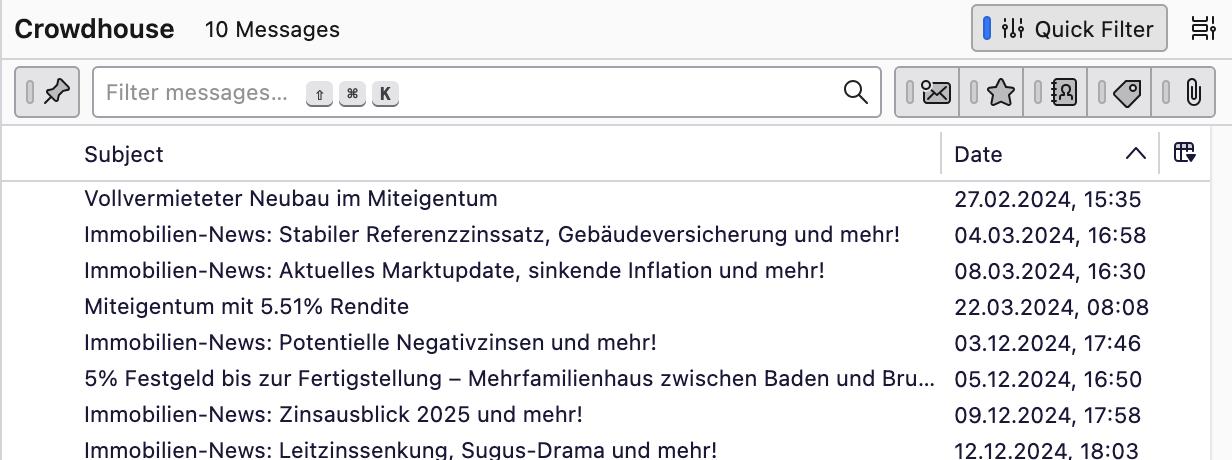
Hi I've uploaded a screenshot of the messages in one of my folders on Thunderbird. All the columns in my folders are like the Date column shown here: i.e., there is no space between the limits of the column and the information, except in the Subject column, where there's a margin of about one centimeter. It makes no difference whether the Subject is the first column or preceded by another column (such as From). How can I get rid of that space/margin? Any help much appreciated Michael
Hi
I've uploaded a screenshot of the messages in one of my folders on Thunderbird. All the columns in my folders are like the Date column shown here: i.e., there is no space between the limits of the column and the information, '''except''' in the Subject column, where there's a margin of about one centimeter. It makes no difference whether the Subject is the first column or preceded by another column (such as From). How can I get rid of that space/margin?
Any help much appreciated
Michael
Alle svar (1)
Valgt løsning
That space is reserved for the icons that indicate a message has been replied to (left arrow) or forwarded (right arrow). See picture.