

Denne tråd blev arkiveret.
Stil et nyt spørgsmål, hvis du har brug for hjælp.

Arkiveret
making up email boxes

how do I make up email boxes like Rogers Wireless or Bell Mobility thanks when U move the email I cant seam to make up stuff to move to.
how do I make up email boxes like Rogers Wireless or Bell Mobility thanks when U move the email I cant seam to make up stuff to move to.
Alle svar (1)
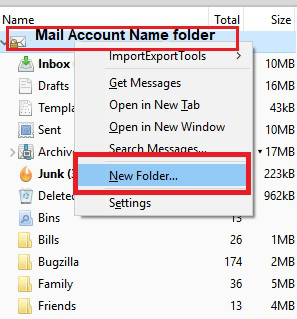
Right click on the mail account name folder in Folder Pane and select 'New Folder'. A small window will open. Name: type in the name of the new folder in the text box. click on 'Create Folder'
In the image you can see I have created some folders called 'Bills', 'Family', 'Friends' etc.
See image as guide.
Ændret af Toad-Hall den