


Firefox 152.0.5 (Windows): Cant browse local router web interface due to "insecure connection"

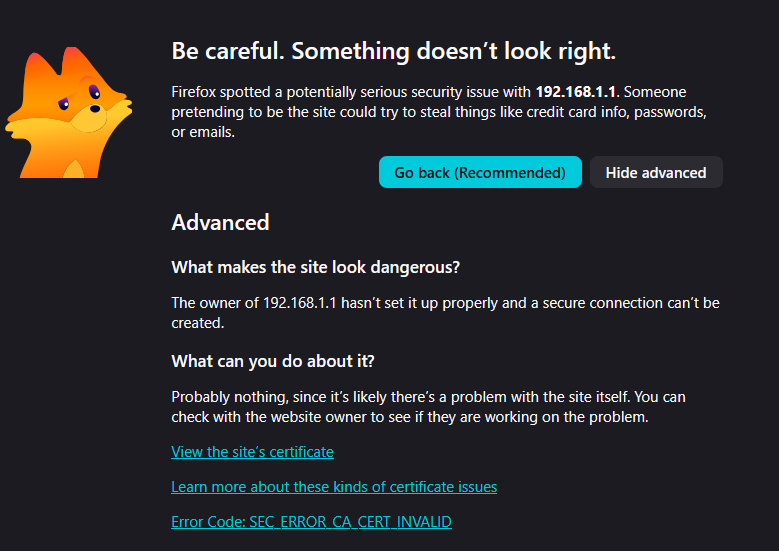
As the title says, with both with https and http firefox displays this warning:
https://i.imgur.com/MQLsaCk.png

But no way to bypass it, trying to login to my ubiquiti edgerouter at http://192.168.1.1 or https://192.168.1.1
What can i do?
All Replies (6)
Hi
The error message that you have shared does walk you through potential solutions for this issue.
If you can disable HTTPS on that device (which apparently isn't configured to serve valid TLS) then you won't be getting the HTTP–to–HTTPS upgrades, which however, should not upgrade if the TLS fails. You can check HTTPS-Only Mode in Firefox how to disable that and see if explicit HTTP will allow you to access or the device will upgrade you to their invalid service anyways.
In general the product should be provisioned with a valid certificate (even of your own) that you can trust. You'd need to however research that in the networking vendor support channels, or see some development blogs on that topic:
Paul, none of the potential solutions are doable. Its a web page to manage a local router in my network.
JBR, https can't be disabled on the device. HTTPS-Only is disabled in firefox.
This has never been a problem in the past as firefox allowed you to bypass this requirement and connect anyway. Edge and chrome are able to do this. But since version 152.0.5 the bypass option ceased to exist. For a power user is a needed option, even if it needs to be enabled via a config flag.
Modified by gonza
CA_CERT_INVALID was added to felt privacy in bugzilla.mozilla.org/2035942
(I wish there was a good test case for that.)
Are you saying that now the error page with the mascot doesn't have the "Proceed" button below the error code, but it was there before?
If you switch security.certerrors.felt-privacy-v1 to false to get the older page, that one has "Proceed" in comparison to the new page?
If so, could you please file a bug? (There definitely should have been parity, if the error is/was recoverable before… thanks!)
Actually I think I spotted where it should have been moved over as recoverable and wasn't. Filed bugzilla.mozilla.org/2054991 if you wanna follow that.
As a side note, it's still an issue on the device/manufacturer side, and this should not be blindly trusted, but bootstrapped with correct CA following their docs if you insist on secure connections. Not everyone claiming to be "power user" is familiar with TLS and X509 internals so see e.g. bugzilla.mozilla.org/show_bug.cgi?id=1067440#c12 for the actual error meaning in this context.
Confirmed, after toggling security.certerrors.felt-privacy-v to false gives me the older page, and it has the option to "accept the risk and continue".
I'm following Bug 2054991 that you created.
Its similar to the old bug you point to that happened with mozilla 32.
Yes, i know it is a problem with the device (Ubiquiti ER-X with latest firmware), but they don't seem to care much about this kind of problems on "old" devices. It still gets firmware upgrades. I tried getting help on the forums but still no luck.