


Picture-in-picture issues

I'm not sure what happened, but the picture-in-picture extension isn't working anymore and there's a sort of "script" (see uploaded image) that shows up over the top of videos, including but not limited to the ones on YouTube. I used to be able to still use the extension by using keyboard commands at first (ctrl shift ]), but now that doesn't work either.
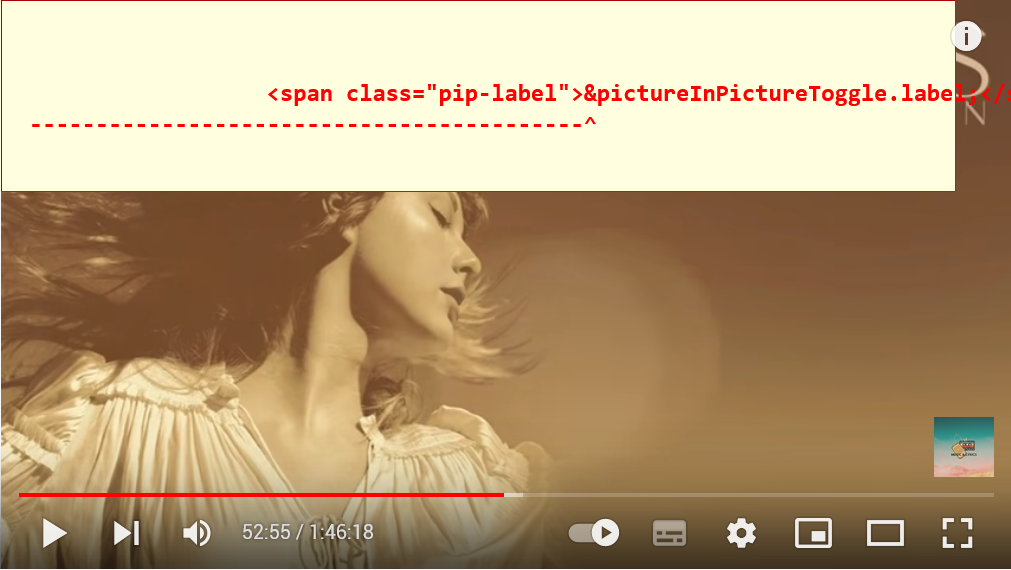
Chosen solution
Hello! This seems to be a known bug You can find more about it in this bug report and reddit post: https://www.reddit.com/r/firefox/comments/u0adxu/when_watching_any_video_this_bar_appears_above_it/ https://bugzilla.mozilla.org/show_bug.cgi?id=1763899
Also, try if it still happens in Troubleshoot Mode: Use Troubleshoot Mode in Firefox
Read this answer in context 👍 1All Replies (4)
Chosen Solution
Hello! This seems to be a known bug You can find more about it in this bug report and reddit post: https://www.reddit.com/r/firefox/comments/u0adxu/when_watching_any_video_this_bar_appears_above_it/ https://bugzilla.mozilla.org/show_bug.cgi?id=1763899
Also, try if it still happens in Troubleshoot Mode: Use Troubleshoot Mode in Firefox
@-elison-
That worked perfectly! Thank you so much!
Note that this usually happens because of a broken or outdated language pack that doesn't support this specific string, so make sure that if you use a language pack you have a version that matches your specific Firefox version.
- Add-ons -> Languages
- Settings -> General -> Language and Appearance
- https://support.mozilla.org/en-US/kb/use-firefox-another-language
You can find the full installer of the current Firefox release (99.0) in all languages and all operating systems here:
@cor-el Thanks for the info! That's super helpful