


Always enable flash for a Site and hide "Menu"
Hi,
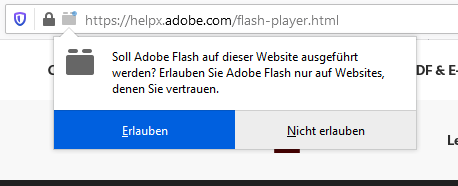
how can i allow flash if i open the Site without will be asked? I have set this in the policies.json. This is currently for testing.
"FlashPlugin": {
     "Allow": ["https://helpx.adobe.com/flash-player.html"],
     "Default": true,
     "Locked": true
   },
But I always have to allow it extra.
And the second question: Can I hide the "Menu" button via policies.json?
Chosen solution
Works for me with the above posted code.
{
  "policies": {
    "FlashPlugin": {
    "Allow": ["https://helpx.adobe.com/"],
    "Default": true,
    "Locked": true
   }
  }
}
Make sure you have the latest Flash installed.
You can download the latest NPAPI Flash plugin for Firefox on this page.
Make sure to remove checkmarks for including unwanted additional software.
Read this answer in context 👍 0All Replies (4)
Try to remove the flash-player.html part and only specify the host.
 "FlashPlugin": {
     "Allow": ["https://helpx.adobe.com/"],
     "Default": true,
     "Locked": true
 },
Thanks for your input. But it makes no difference. With an older version (63) it also works fine with "flash-player.htm". So seems to have been changed in some version. Someone have an idea how that works with a more recent version.
Chosen Solution
Works for me with the above posted code.
{
  "policies": {
    "FlashPlugin": {
    "Allow": ["https://helpx.adobe.com/"],
    "Default": true,
    "Locked": true
   }
  }
}
Make sure you have the latest Flash installed.
You can download the latest NPAPI Flash plugin for Firefox on this page.
Make sure to remove checkmarks for including unwanted additional software.
You can check the about:policies page for possible errors.