


Weird characters in Firefox after refresh

firefox was running a little slow, so I recently refreshed it, following the instructions outlined in this article https://support.mozilla.org/en-US/kb/refresh-firefox-reset-add-ons-and-settings it was working fine for a short while and now certain pages such as facebook and twitter are displaying jumbled characters. I tried restarting which fixes the issue but only for a few hours. I also tried uninstalling and reinstalling firefox with no luck.
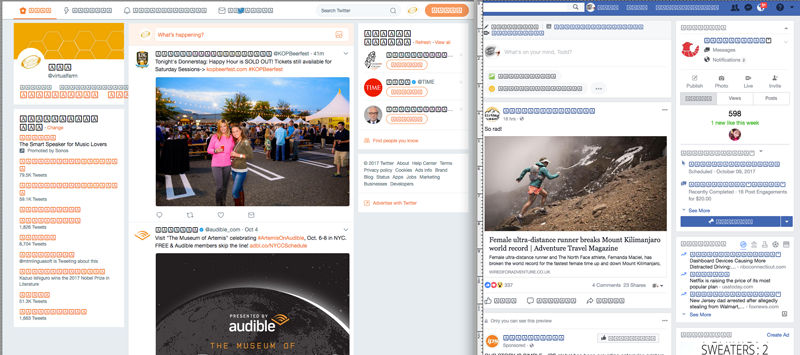
Modified by JocelynHinkle
Chosen solution
We have seen cases where a box with all '?' or all 'A' is displayed that might be related to using a Last Resort font that displays all the glyphs with one same character.
You can try to set this pref to 1 on the about:config page.
- security.sandbox.content.level = 1
You can open the about:config page via the location/address bar. You can accept the warning and click "I'll be careful" to continue.
See also:
- [/questions/1178317] fonts displaying as 'A' in a box
All Replies (3)
Can you attach a screenshot?
- https://support.mozilla.org/en-US/kb/how-do-i-create-screenshot-my-problem
- use a compressed image type like PNG or JPG to save the screenshot
Try to copy the cert8.db file from the "Old Firefox Data" folder on the desktop to the current profile folder.
You can use the button on the "Help -> Troubleshooting Information" (about:support) page to go to the current Firefox profile folder or use the about:profiles page.
- Help -> Troubleshooting Information -> Profile Directory:
Windows: Show Folder; Linux: Open Directory; Mac: Show in Finder - http://kb.mozillazine.org/Profile_folder_-_Firefox
See also:
I tried all of these suggestions and still experiencing the issue
Chosen Solution
We have seen cases where a box with all '?' or all 'A' is displayed that might be related to using a Last Resort font that displays all the glyphs with one same character.
You can try to set this pref to 1 on the about:config page.
- security.sandbox.content.level = 1
You can open the about:config page via the location/address bar. You can accept the warning and click "I'll be careful" to continue.
See also:
- [/questions/1178317] fonts displaying as 'A' in a box