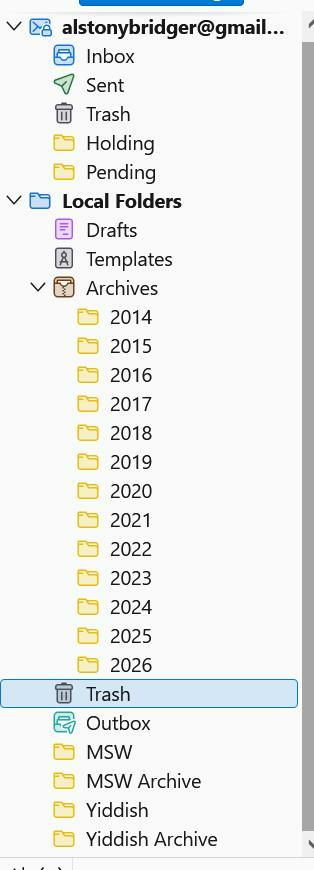
Delay moving pop messages to or from 4 specific mailboxes (win10, v152). (debug process stuck at "Could not start browser toolbox. You need to enable it.") Cause: McAfee
It's very odd. Normally moving an email, say from the Inbox to the relevant year's archive, takes "no time at all".
Which is true for all the mailboxes shown on the attached screenshot, EXCEPT for the four at the bottom. Moving even one message from Inbox to Yiddish can take ten seconds or longer (with the dreaded "Not Responding" occasionally). Moving something in the opposite direction is also screwy, only from those four.
I had thought that it was because they're rather large. This first started when there were just Yiddish and MSW, and I split off most of the earlier years into the archives shown. To no avail.
It's only an annoyance, but I'm puzzled about how such a thing could happen.
Also very slow tagging or untagging a message just in those mailboxes.
Moderator Notes:
- need a performance profile https://support.mozilla.org/en-US/kb/profiling-thunderbird-performance
Okulungisiwe ngu Wayne Mery
Isisombululo Esikhethiwe
That's interesting: with McAfee disabled, the slow mailboxes are no longer slow.
So why does McAfee pick on user-created mailboxes and not the ones "owned" by T'bird?
Do you still want a profile with McAfee disabled?
All Replies (66)
Uninstall should not be necessary.
A combination of https://share.google/jAu6enYAwBBObwWWn and https://share.google/2Cn4ImUy3rXcsVSeg
Isisombululo Esikhethiwe
That's interesting: with McAfee disabled, the slow mailboxes are no longer slow.
So why does McAfee pick on user-created mailboxes and not the ones "owned" by T'bird?
Do you still want a profile with McAfee disabled?
(1) Does T'bird create user's mailboxes differently to its own?
(2) What makes McAfee churn when accessing user's mailboxes, but not T'bird's own?
What now?
I never attempt to reason with McAfee.
See https://wiki.mozilla.org/Thunderbird:Testing:Antivirus_Related_Performance_Issues#McAfee
So it's a McAfee bug, eh?
And the suggested workarounds all seem to involve disabling virus scanning (they brag about stopping threats in emails a few times a week). Not a good idea.
I'm not about to speak w/ McAfee either, but that's not really my job. And the questions I posed in my last post here apply from both sides.
Does Mozilla hereby wash its hands?
Washing one's hands?