


Address bar jumps to top of window when I type

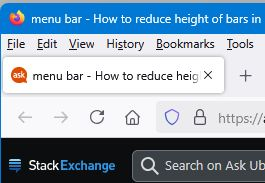
I am one of those old-fashioned guys who has a title bar on the main window, and inside this (from top to bottom) a menu bar (File/Edit/View etc), then the current set of tabs, then the address bar.
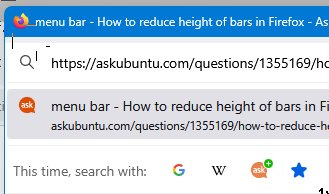
I can click in the address bar and the caret appears, but the moment I start to type anything to edit the URL the address bar jumps up to to the top of the window, covering up the menus and tabs, with a menu of suggested URLs that at times covers most of the rest of the screen. Some images attached to show what I mean.
This started in a recent-ish release -- it didn't use to do this.
How can I prevent this behaviour, so I can just edit a URL in place the way I used to without the address bar jumping to the top of the window?
Currently using FF 135.0 (64-bit), Windows 11.
Okulungisiwe ngu Frustrated_John
Isisombululo esikhethiwe
Do you use a custom userChrome.css file?
Try to enter about:config in the address bar and confirm if toolkit.legacyUserProfileCustomizations.stylesheets is false.
Funda le mpendulo ngokuhambisana nalesi sihloko 👍 1All Replies (2)
Isisombululo Esikhethiwe
Do you use a custom userChrome.css file?
Try to enter about:config in the address bar and confirm if toolkit.legacyUserProfileCustomizations.stylesheets is false.
Sorry for the delay in replying. Yes, that fixed it. Many thanks. Now all I have to do is remember if there was a reason why it was set true in the first place...!