


Pages show in foreign non-english language

Hello, Im using localized (Lithuanian) version of Firefox. Several updates back, Firefox started including russian and Polish in preferred languages by default. Personally i know how to remove those for myself. However, since im managing around 300 computers in a school. This starts to become an issue. In Lithuania we only have one official language. And when pages in a school start opening in foreign (russian) language this starts to be quite annoying. I would love to keep using Firefox but i need help.
被選擇的解決方法
Hi,
To manage this list:
- Click the menu button
 and select Settings.
- In the General panel, go down to Language.
- Click Choose next to Choose your preferred language for displaying pages.
- In the popup:
- Use Add to select more languages
- Use Remove to delete unwanted entries
- Use Move Up / Move Down to change priority
- Click OK.
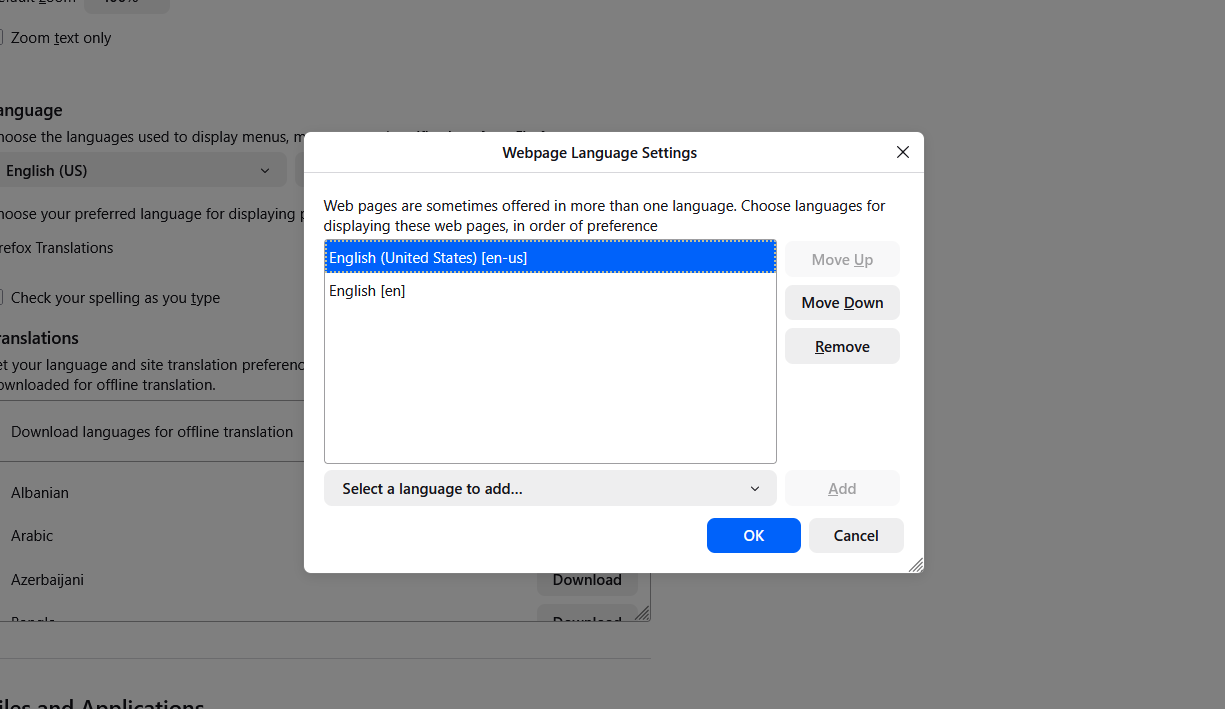
For computers in a domain, you can use the RequestedLocales group policy.
從原來的回覆中察看解決方案 👍 1所有回覆 (5)
Clarification: since Lithuanian is not that popular in the world - all the pages show in russian language by default (even Mozilla itself). Not english. Only old people remember russian.
由 lietuv1s 於 修改
選擇的解決方法
Hi,
To manage this list:
- Click the menu button and select Settings.
- In the General panel, go down to Language.
- Click Choose next to Choose your preferred language for displaying pages.
- In the popup:
- Use Add to select more languages
- Use Remove to delete unwanted entries
- Use Move Up / Move Down to change priority
- Click OK.
For computers in a domain, you can use the RequestedLocales group policy.
Should I report a bug about default language set for LT, what do you think?
russian is an obvious choice for removal, but still there's about 100k russian babushkas in Lithuania.
由 TyDraniu 於 修改
Huh. So I asked about this a few times, in terms of what's acceptable and politically alright, and, well, just plain sensitive… for some other regions. These defaults, as in what a locale ships for some default prefs in the browser, actually comes from the localization volunteer community itself:
(For this particular entry I was not able to track back where the decision happened, as I got lost in the history logs about two decades back…)
The good thing is that you can just easily reach out to your local community: https://pontoon.mozilla.org/lt/firefox/team-info/ and discuss changing this value: https://pontoon.mozilla.org/lt/firefox/toolkit/chrome/global/intl.properties/?string=81017
I do remember half or one year ago of that list consisting of only Lithuanian and English. Either that or im using the good thing everyone is after. My point I guess would be: russian babushkas are using russian localized version anyway. Same with Polish people.
Is this the question of what shows up if theres no translation to a default (Lithuanian) language? Is English or russian more fitting to act as a fallback. Right now most 44y-olds dont speak or understand russian. Looks like these are the questions i should be asking a localization volunteer community.
Thank you both TyDraniu and jbr for your time spent and good advices. I did not expect this to be that fast honestly.