


Windows 10 reached EOS (end of support) on October 14, 2025. If you are on Windows 10, see this article.

搜尋 Mozilla 技術支援網站

防止技術支援詐騙。我們絕對不會要求您撥打電話或發送簡訊,或是提供個人資訊。請用「回報濫用」功能回報可疑的行為。

了解更多

Firefox ignores css style for hamburger menu after updating from 150.0.3 to 151

  • 1 回覆
  • 0 有這個問題
  • 最近回覆由 Piterk
  • 已解決

I have custom userChrome file that made my history and hamburger menu (application menu / settings) text and distances smaller since Firefox introduced this ugly feature, trying to be cool in windows 10 times. Nowadays even windows 11 brings back compact mode but firefox still uses huge spacing. I just fixed issue with custom CSS and forgot about it. Unfortunately, after updating to FF 151, my CSS is ignored and I am forced to new ugly context menu. What is weird, I still have good small pacing when right-clicking pages, UI elements and when I enter bookmarks. Only places that ignore my CSS are hamburger menu for settings and list under history view. I do not really understand this code, I just copied it from someone else. Can someone help me fix this issue?

menupopup > menu, menupopup > menuitem{ padding-block: 3px !important; min-height: 0px !important; }

root{

--arrowpanel-menuitem-padding: 0px !important; }
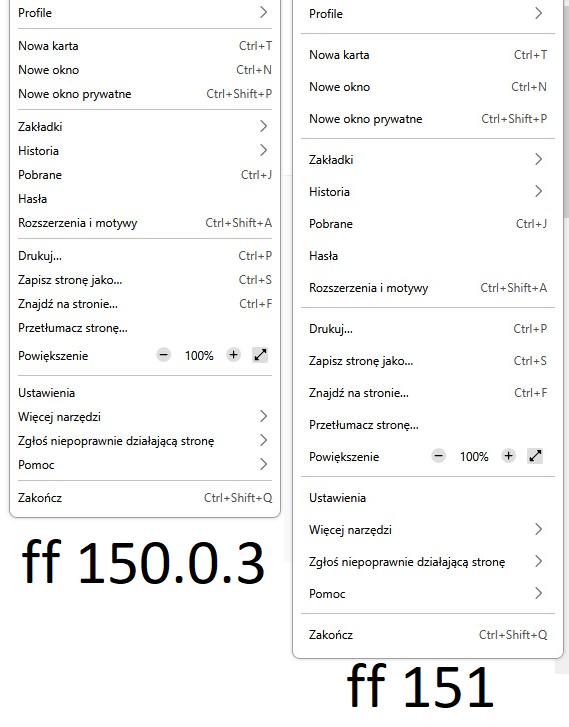
I have custom userChrome file that made my history and hamburger menu (application menu / settings) text and distances smaller since Firefox introduced this ugly feature, trying to be cool in windows 10 times. Nowadays even windows 11 brings back compact mode but firefox still uses huge spacing. I just fixed issue with custom CSS and forgot about it. Unfortunately, '''after updating to FF 151, my CSS is ignored and I am forced to new ugly context menu'''. What is weird, '''I still have good small pacing when right-clicking pages, UI elements and when I enter bookmarks. Only places that ignore my CSS are hamburger menu for settings and list under history view'''. I do not really understand this code, I just copied it from someone else. Can someone help me fix this issue? menupopup > menu, menupopup > menuitem{ padding-block: 3px !important; min-height: 0px !important; } :root{ --arrowpanel-menuitem-padding: 0px !important; }
附加的畫面擷圖

由 Piterk 於 修改

被選擇的解決方法

nevermind, I found solution on reddit. Just replace --arrowpanel-menuitem-padding: 0px !important; with: --panel-menuitem-padding: 0px !important;

從原來的回覆中察看解決方案 👍 0

所有回覆 (1)

選擇的解決方法

nevermind, I found solution on reddit. Just replace --arrowpanel-menuitem-padding: 0px !important; with: --panel-menuitem-padding: 0px !important;

由 Piterk 於 修改

問個問題

如果您還沒有帳號,您必須先登入帳號 來回覆文章。還沒有帳號的話,只能發問新問題