


Tabs are automatically changing to spam sites

I have many tabs open at the same time and I'm noticing tabs from Urban Dictionary in particular are automatically changing to suspicious sites, quite a few porn sites in fact.
Is this something Urban Dictionary is doing to direct viewers to sponsors or is there a bug in my FF browser?
所有回覆 (6)
Screenshot attached.
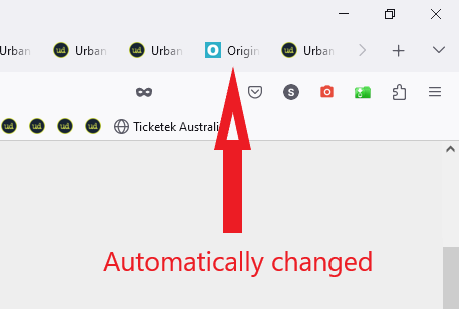
Try disabling your extensions.
Blocking ads with something like uBlock Origin may help.
> Try disabling your extensions.
I only have 4 extensions, see image. I've had them for a long time with no issue.
> Blocking ads with something like...
They aren't exactly ads or pop-ups.
The whole tab directs to another site, the URL automatically changes while I'm browsing another tab.
s
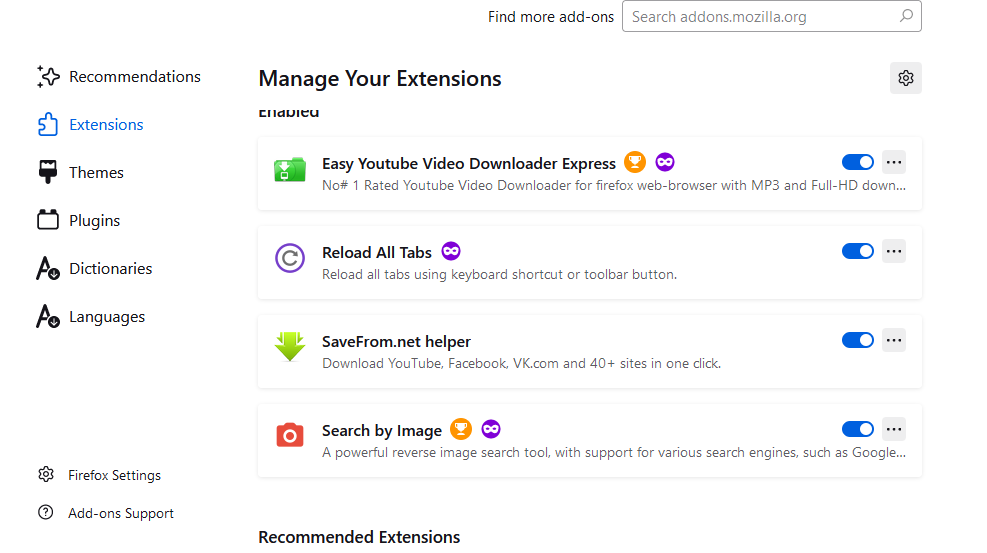
由 stephenslr1 於 修改
Extensions update automatically in the background which can cause their behavior to change suddenly without notice. Both your video downloader extensions were updated recently.
Does it still happen in Troubleshoot Mode?
I'll Troubleshoot Mode a go the next time it happens.
Since posting it's behaving as normal. It was bugging me for only a few days.
s
You can do a malware scan, just to be sure.