


Dates change on their own.

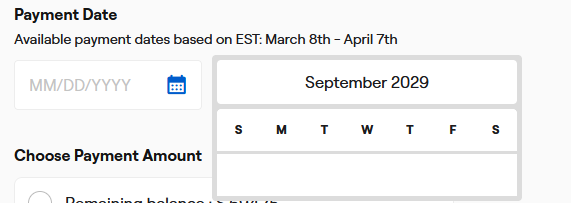
Firefox doesn't seem to handle date entries properly. For example, when I set a date on a website it automatically changes to something other than what I set it to. Sometimes it's off by a day, sometimes it's off by a dozen days. Sometimes when the site displays a calendar navigator (showing the year and a monthly calendar where you can cycle through the year and month to select a specific day on the calendar) there's no calendar to select from. There might be a year and month selector that I can cycle through but there's no calendar to make a selection. If there is a calendar and I select a date, a different date is displayed in the entry box. This also happens when I manually enter a date. I could type 3/8/2024 and when I hit tab or click off the box it will change to 3/6/2024 or something like that. It's not always the same number of days off. I could then enter 3/10/2024 to try to trick it, but it might display 3/9/2024. The issue seems to extend behind the scenes. For example if I'm paying a bill online the site will automatically show today's date as the day the payment should be made, and it will display correctly, but when I submit my payment an error indicates that the payment date occurs in the past. I have to change the date to a day or two in the future in order for the site to process the payment. I recently noticed in my Geico Timeline, where I can see a history of events, as I scroll, the dates will flicker to a day prior and sometimes they will stay on the day prior until I scroll again and it changes back. Only the day number changes, the time and year remain the same, and it's always to one day prior.
I've run Malware Bytes, Spybot S&D, and Windows virus scan. I've updated Firefox (set to automatic) and disabled plugins. I don't have the problem on other browsers.
所有回覆 (7)
Start Firefox in Troubleshoot Mode to check if one of the extensions ("3-bar" menu button or Tools -> Add-ons -> Extensions) or if hardware acceleration or if userChrome.css/userContent.css is causing the problem.
- switch to the Default System theme: "3-bar" menu button or Tools -> Add-ons -> Themes
- do NOT click the "Refresh Firefox" button on the Troubleshoot Mode start window
Thanks for replying. Starting Firefox in troubleshoot mode had no effect.
Does it still happen in a new profile? An easy way to test a new profile is to install Developer Edition and see if it happens there or refresh your existing profile. Make sure you stay signed out of your sync account when testing.
I did a refresh and that didn’t solve it. I don’t have a sync account.

Creating a new profile may fix the issue.
https://support.mozilla.org/en-US/kb/profile-manager-create-remove-switch-firefox-profiles
https://support.mozilla.org/en-US/kb/recovering-important-data-from-an-old-profile https://support.mozilla.org/en-US/kb/profiles-where-firefox-stores-user-data#w_what-information-is-stored-in-my-profile
Boot the computer into Windows Safe Mode with network support to see if that has effect.
- https://www.bleepingcomputer.com/tuto.../how-to-start-windows-in-safe-mode/
- https://www.digitalcitizen.life/4-ways-boot-safe-mode-windows-10/
You can do a malware scan, just to be sure.
Unfortunately my network adapter doesn’t function in safe mode.