


Yahoo has a single Spam folder, but Thunderbird shows 2 for Yahoo

Hello,
I hope you're doing well.
I noticed that in Thunderbird, my Yahoo account has both a Bulk and a Junk Spam folder. My Yahoo account online and in the app only shows one Spam folder for all such messages.
How can I ensure that I only have a single Spam folder, as is normal? I want to keep mail organization as simple as possible.
Thanks in advance!
All Replies (5)
Please note that https://support.mozilla.org/en-US/kb/thunderbird-and-junk-spam-messages does not address the problem I am having. I have disabled adaptive spam controls in the Yahoo account and for Thunderbird in general, and I still see two Spam folders in my Yahoo account.
To sum up the issue: in the Yahoo app and on the Yahoo Mail site, my Yahoo account has *1* Spam folder. Thunderbird shows *2,* and I cannot correct this myself.
This is a result of developers fixing something that was not broken.
You will find if you right click on your spam folders, one at a time and select properties you will see one of them is actually called "Bulk: or "Bulk mail". This is the part of the developers fix what was not broken, they felt folk would be confused by using the correct folder name so devided to over ride it with SPAM.
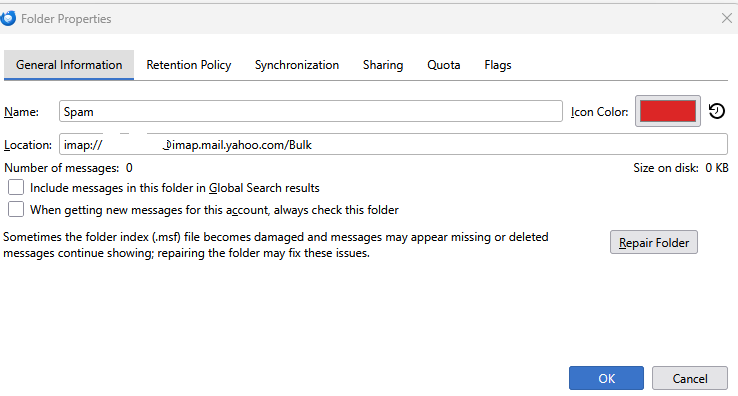
Now if you go into your account settings (right click the account in the folder pane and select settings.) You can set the folder Thunderbird uses for SPAM/Junk mail. Due to some vagaries between Yahoo and Thunderbird Thunderbird will have set historically a junk folder to be used for spam. set Thunderbird to use other and move on to setting the bulk folder which will probably show in the folder list as SPAM. Once that is cleared up the icon on the incorrect folder will change to the normal yellow folder type and you can delete it.
In Spam Settings, I see the following:
Move new spam messages to:
- "Spam" folder on ...@yahoo.com (selected), or
- Other: Spam on ...@yahoo.com (the folder name has a flame next to it)
I have disabled adaptive spam controls.
Which folder do I need to select, and how do I get rid of or rename the Bulk folder? I have created a Promotions folder for such messages.
Sounds like https://bugzilla.mozilla.org/show_bug.cgi?id=2012280
I don't think disabling adaptive would help.
Someone else advised me to disable adaptive learning for spam a day or more ago.
I still don't know how to change the settings (or folder name) for bulk/promotional emails. Spam should be spam, and the two folders look exactly the same now, prior to checking Properties. I don't want two folders with the same identity--they aren't.
I am in the United States and have Thunderbird 157.0.1 and Windows 11 26H2 64-bit.