


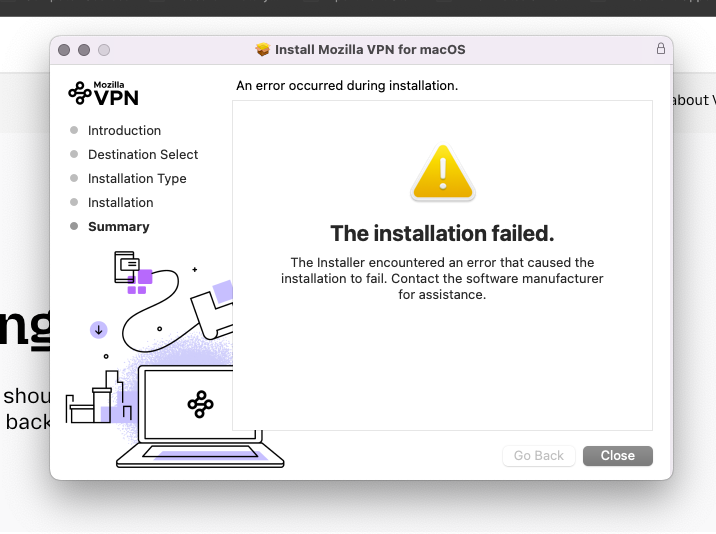
INstallation of Mozilla VPN keeps saying failed

Hi
I had to uninstall my VPN because it was frozen, and I couldn't even switch it on, even when I restarted my computer.
This has happened before, so I had it uninstalled & then downloaded it again.
You will see proof, by the screenshot I have attached to this email, please advise manufacturer.
My OS has the latest updates MacOS Monterey 12. 7. 6
Kind Regards
Joe
Isisombulu esikhethiweyo
Hi Joe,
Just checking in if one of these answers actually helped you (you can mark it as a solution by yourself). Otherwise, I strongly recommend reaching out to our front line agents by creating a support ticket from here (it's a different support channel from this peer to peer support).
Funda le mpendulo kwimeko leyo 👍 0All Replies (5)
Hi,
Mozilla VPN is one of our premium products. In order to get premium support from a dedicated agent, please sign in to the Mozilla account connected to your subscription (if not already) and then use this link to submit your question.
I am a subscriber to your VPN network, why would I ask about the installation fail if I wasn't???
See https://www.mozilla.org/products/vpn/download/
The system requirements for the newest version of Mozilla VPN is Macos 13.0. Try to find some older installer that could work.
The page at https://www.mozilla.org/products/vpn/download/ actually has a smaller "Download previous versions for Windows and Mac" link that leads to archive of all older installers. I see the requirement from macOS 11 to macOS 13 was changed earlier this year, so users report that v2.32.0 works for them on Monterey. It can be downloaded from here: https://archive.mozilla.org/pub/vpn/releases/2.32.0/mac/
Isisombululo esiKhethiweyo
Hi Joe,
Just checking in if one of these answers actually helped you (you can mark it as a solution by yourself). Otherwise, I strongly recommend reaching out to our front line agents by creating a support ticket from here (it's a different support channel from this peer to peer support).