


I can,t recieve my emails

Hello , Could somone please help me figure out why i can,t recieve my emails ? thanks Glenn
All Replies (12)
To get assistance, you need to post complete error message and a screenshot of the incoming server settings pane. thank you.
Hi David thanks for your reply . I never got a error message i just realized my emails were'nt coming in . How do i post a server settings pic ? thanks Glenn
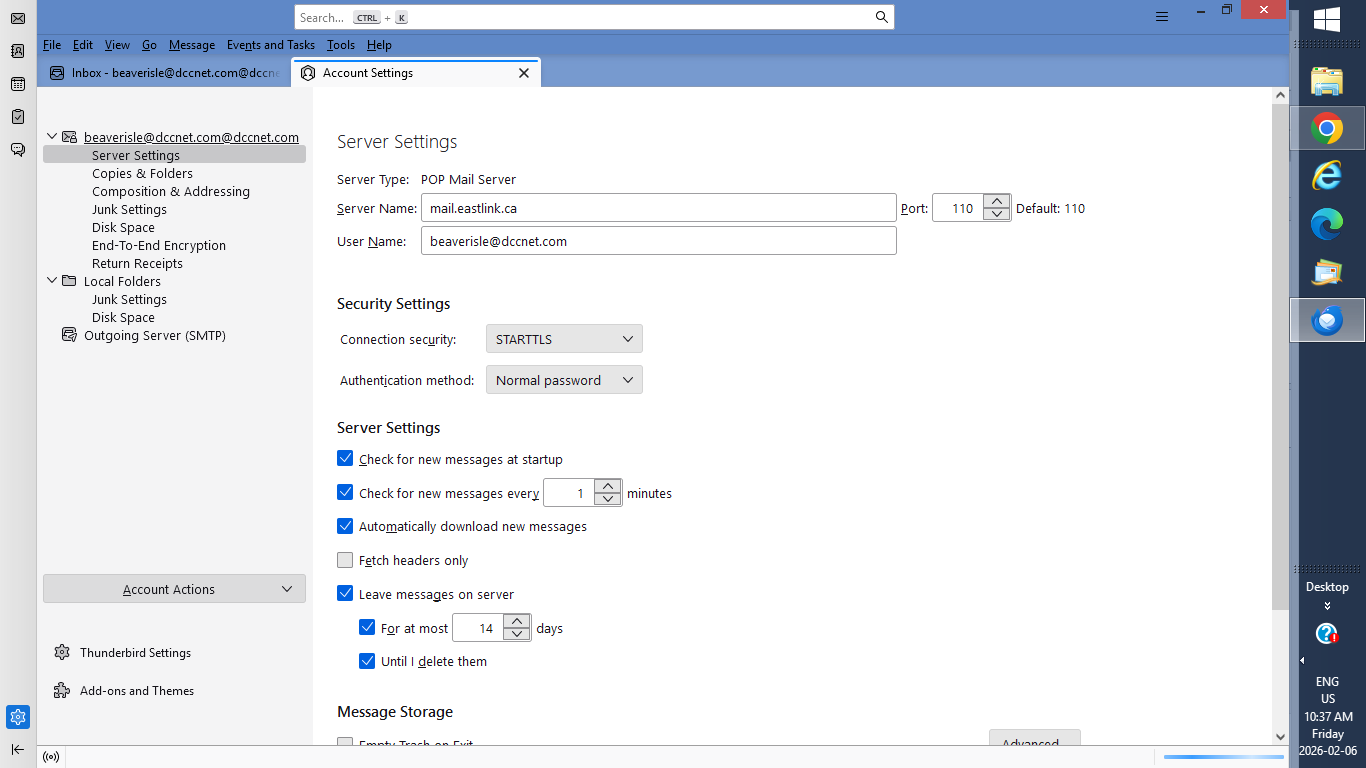
Hi David , thanks for reply . I tried to change that but its sais its being used ok . Glenn
change from STARTTLS to SSL/TLS also. That, and the 995, are the automatic recommendations by thunderbird.
Hi David , I did manage to change both those setting but still no luck on getting my emails . I hate to be a pain in the ass on this but its looking like i will have to try and find a laptop tech in the next town i guess ? as where i live theres no one doing repairs anymore . thanks for your all your help , Glenn
Glennallen, I would recommend for you to contact the company that is providing you with e-mail service, as they would be able to tell you for sure which e-mail settings to use. It appears that your e-mail address ending in dccnet.com is most likely being managed by Delta Cable Communication (EastLink). I found that EastLink publishes the following instructions regarding e-mail settings:
https://help.eastlink.ca/internet-wifi/configuring-your-eastlink-email-address/
It appears that you should be using port 993.
If you are not able to resolve the problem on your own, you might want to try calling EastLink on the phone using their contact information which they provide at this page:
By the way, after you do get it working, you might want to change the "check for new messages every x minutes" setting. You currently have this set at every 1 minutes, which does create a bit of extra workload for the mail server. Personally, just to be kind to the mail server, I set this to 10 minutes, and whenever I am in a hurry to receive an e-mail that I am expecting, then I will use the "File" menu's "Get New Message" function to manually initiate a mail check.
I hope this helps!
yeah,
Eastlink give the server settings to use as https://help.eastlink.ca/internet-wifi/configuring-your-eastlink-email-address/
Incoming mail server settings Account Type: POP or IMAP Server: mail.eastlink.ca Port: 993 Security: SSL/TLS Username: Full email address Password: Your email password
So while Port 995 is the default you don't use it with them.
Now you say you do not get any error message. Really I think that is just about impossible. Is there nothing in the windows notifications, the error console (ctl+Shift+J) or the Thunderbird activity manager
Hi , thanks guys i will try and get a hold of eastlink now . And i am still running an old windows 8 so no undates maybe thats why no error messages ? thanks again G