


Reset Folder Order doesn't work

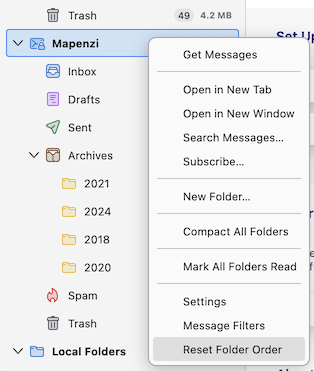
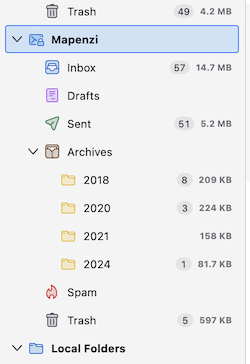
My archive folders have gone out of order alphanumerically. I have tried right clicking the account and selecting "Reset Folder Order" but this has no effect. I have also tried moving folders manually and found that certain folders refused to move. Also after a restart all the folders I have moved appear at the end of the list of folders. This is very inconvenient as I have built up a large number of archive folders over the years. I am on the Release update channel and my version of Thunderbird is up to date (146.0.1 (64-bit)). I haven't been able to upload ab image because I get contstant error message "Error uploading image".
All Replies (3)
This will be fixed in the upcoming v147.0
✔︎ Fixed: Resetting manual folder sorting did not work for sub folders (from v147.0 release notes)
Ilungisiwe ngu Mapenzi
I just tested with subfolders in the "2018" archives folder and it works. I won't test more hierarchy levels.... The release might be available on January 13
Ilungisiwe ngu Mapenzi