


Join us to show up for other Firefox users 🦊. Earn fun badges and Mozilla swag vouchers! Find out more: https://mzl.la/askafox150

Windows 10 reached EOS (end of support) on October 14, 2025. If you are on Windows 10, see this article.

Search Support

Avoid support scams. We will never ask you to call or text a phone number or share personal information. Please report suspicious activity using the “Report Abuse” option.

Learn More

Printing PDF

  • 2 iimpendulo
  • 0 inale ngxaki
  • 121 views
  • Impendulo yokugqibela ngu Desri
  • Esonjuliweyo

When printing a PDF with custom page ranges, the footer text in the print preview (see image) does not match the actual page. As shown in the example image, if I want to print pages 2-16, the preview indicating page 4 is actually page 5.

So, if I want to print with a very custom range, such as 2-4, 6-10, 12-14, 16, it will be very confusing and will take longer to adjust.

And I also print custom ranges like this very often for daily tasks. I’m not sure if this is a bug or just a minor adjustment needed in Firefox’s coding. Thank you in advance for your help.
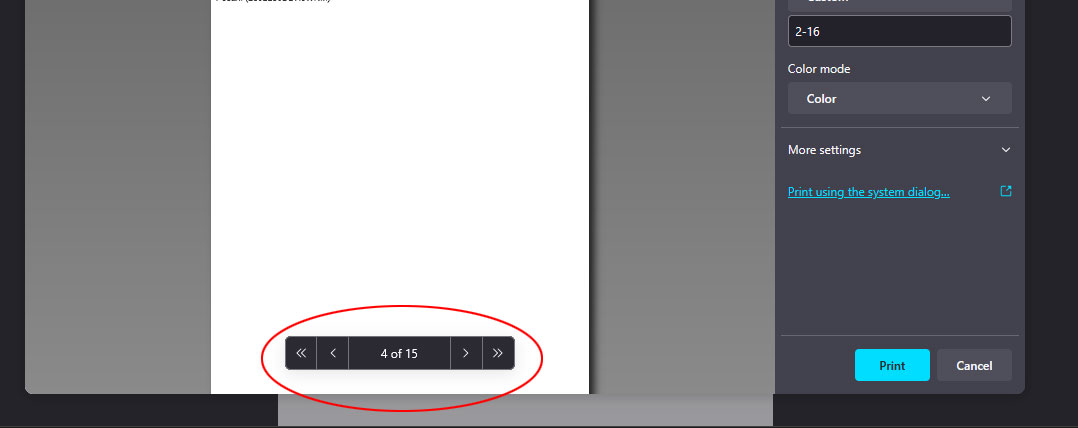
When printing a PDF with custom page ranges, the footer text in the print preview (see image) does not match the actual page. As shown in the example image, if I want to print pages 2-16, the preview indicating page 4 is actually page 5. So, if I want to print with a very custom range, such as 2-4, 6-10, 12-14, 16, it will be very confusing and will take longer to adjust. And I also print custom ranges like this very often for daily tasks. I’m not sure if this is a bug or just a minor adjustment needed in Firefox’s coding. Thank you in advance for your help.
Iqhotyoshelwe imifanekiso ekwisikrini

Isisombulu esikhethiweyo

I solved the problem, after I switched to Chrome. 👍

Funda le mpendulo kwimeko leyo 👍 0

All Replies (2)

the firefox version 135.0.1 (64-bit) in Win 11

Isisombululo esiKhethiweyo

I solved the problem, after I switched to Chrome. 👍

Ilungisiwe ngu Desri