


Why does following appear when click on Desktop shortcut icon to go on Mozilla Firefox? This is new recently.

Smartbar
file///C:/Documents%20and%20Settings/Owner/Applications%20Data/Mozilla/Firefox/Profiles/al9rtzp5.default/extensions/%7Bbb45ef8e-1e36-4535-a017-ec908fb1e335%7/chrome/CT3101810/content/tb/al/al.view.html
Clicking on icon should go to my homepage CNN.com, but this above appears in Library before the homepage.
Just finished doing a security tango to totally clean my system.
Tất cả các câu trả lời (3)

Giải pháp được chọn
Hello, it is likely that there was an invalid extension installed on the Firefox. Can you please try to start Firefox in Safe Mode and then see if you are seeing the issue
Try Firefox Safe Mode to see if the problem goes away. Safe Mode is a troubleshooting mode, which disables most add-ons.
(If you're not using it, switch to the Default theme.)
- On Windows you can open Firefox 4.0+ in Safe Mode by holding the Shift key when you open the Firefox desktop or Start menu shortcut.
- On Mac you can open Firefox 4.0+ in Safe Mode by holding the option key while starting Firefox.
- On Linux you can open Firefox 4.0+ in Safe Mode by quitting Firefox and then going to your Terminal and running: firefox -safe-mode (you may need to specify the Firefox installation path e.g. /usr/lib/firefox)
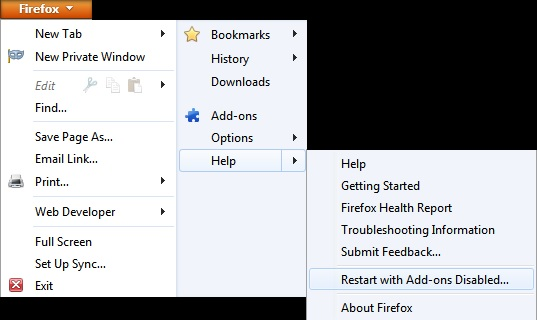
- Or open the Help menu and click on the Restart with Add-ons Disabled... menu item while Firefox is running.
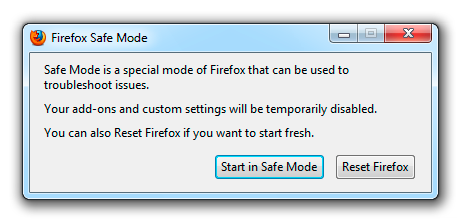
Once you get the pop-up, just select "'Start in Safe Mode"
If the issue is not present in Firefox Safe Mode, your problem is probably caused by an extension, and you need to figure out which one. Please follow the Troubleshoot extensions, themes and hardware acceleration issues to solve common Firefox problems article for that.
To exit the Firefox Safe Mode, just close Firefox and wait a few seconds before opening Firefox for normal use again.
When you figure out what's causing your issues, please let us know. It might help other users who have the same problem.
Thank you.
Hello,
Try Firefox Safe Mode to see if the problem goes away. Safe Mode is a troubleshooting mode, which disables most add-ons.
(If you're not using it, switch to the Default theme.)
- On Windows you can open Firefox 4.0+ in Safe Mode by holding the Shift key when you open the Firefox desktop or Start menu shortcut.
- On Mac you can open Firefox 4.0+ in Safe Mode by holding the option key while starting Firefox.
- On Linux you can open Firefox 4.0+ in Safe Mode by quitting Firefox and then going to your Terminal and running: firefox -safe-mode (you may need to specify the Firefox installation path e.g. /usr/lib/firefox)
- Or open the Help menu and click on the Restart with Add-ons Disabled... menu item while Firefox is running.
Once you get the pop-up, just select "'Start in Safe Mode"
If the issue is not present in Firefox Safe Mode, your problem is probably caused by an extension, and you need to figure out which one. Please follow the Troubleshoot extensions, themes and hardware acceleration issues to solve common Firefox problems article for that.
To exit the Firefox Safe Mode, just close Firefox and wait a few seconds before opening Firefox for normal use again.
When you figure out what's causing your issues, please let us know. It might help other users who have the same problem.
Thank you.
Thanks----turns out it was an extension--deleted it & all good