


load previous tabs when starting

I know Mozilla recently created a "feature" that had Firefox load only one tab/page from a previous session upon starting up, regardless of how many tabs/pages were open when Firefox was last closed. I want to reverse this, and have all tabs load simultaneously when Firefox is started up. Can anyone provide the about:config command I can use to revert to previous behavior?
I'm using version 15.0
- many thanks
Giải pháp được chọn
Hi, jsher2000,
This may be a question of platforms or versions but I think what you are referring to is under the "tabs" section of preferences on my Firefox preferences pages. There is no "Don't load tabs until selected" option in the "General" area but I did see "Don't load tabs until selected" check box under "Tabs". I unchecked that. I assume this will solve my problem and, therefore, I will say you solved my issue. Many thanks for your help. (I feel like an idiot for not seeing that option previous to posting my question but… there you are.)
- best
Đọc câu trả lời này trong ngữ cảnh 👍 0Tất cả các câu trả lời (5)
Firefox > Preferences > General
In the Startup section, uncheck "Don't load tabs until selected"
Giải pháp được chọn
Hi, jsher2000,
This may be a question of platforms or versions but I think what you are referring to is under the "tabs" section of preferences on my Firefox preferences pages. There is no "Don't load tabs until selected" option in the "General" area but I did see "Don't load tabs until selected" check box under "Tabs". I unchecked that. I assume this will solve my problem and, therefore, I will say you solved my issue. Many thanks for your help. (I feel like an idiot for not seeing that option previous to posting my question but… there you are.)
- best
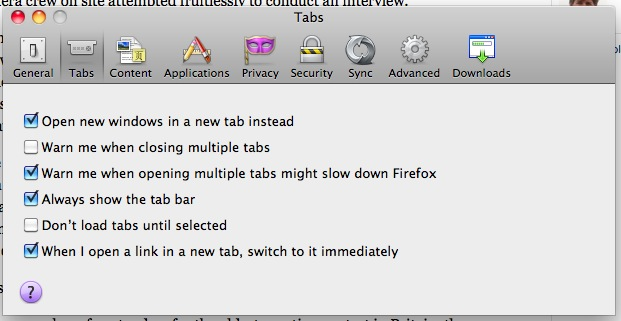
Thanks for the picture. It's always risky for us Windows users to try to imagine how things look on the Mac.
That appears to be a change in Firefox versions 15 and later where I see that item in the Tabs panel instead of in the General panel.
Hi, cor-el,
Yes. Things do move around. But continue to get better, too!
Thanks for your response, as well as jsher2000's advice. Much appreciated.