

Chủ đề này đã được lưu trữ.
Vui lòng hỏi một câu hỏi mới nếu bạn cần giúp đỡ.

Đã lưu trữ
Firefox opens with my tabs from my last session even though my options are set to show my homepage on start up.

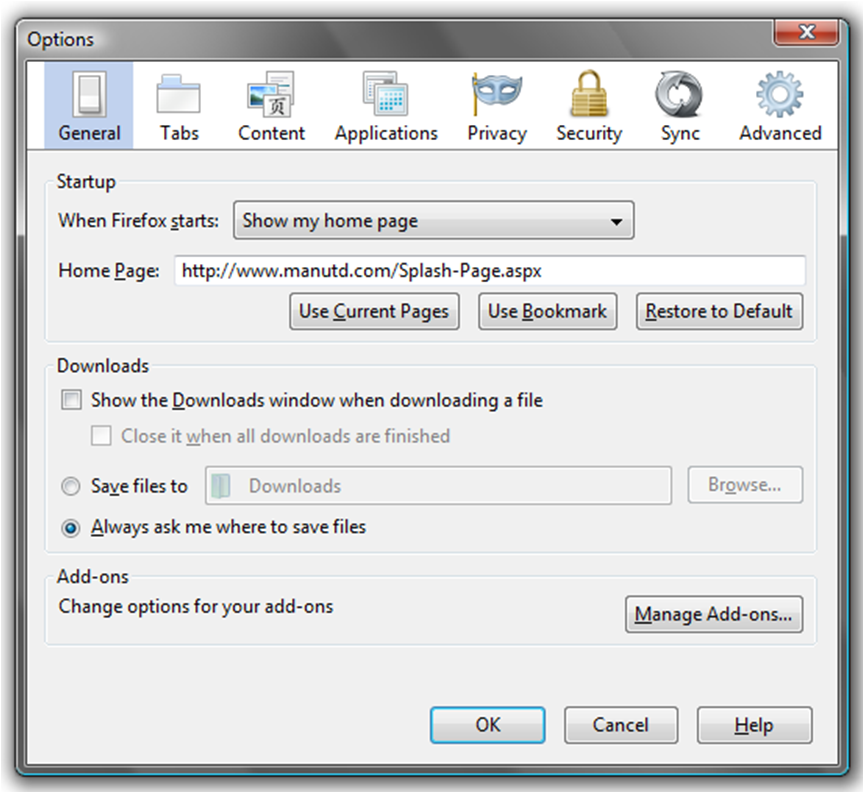
Whenever I open Firefox, it starts up with my tabs from my last session even though I have "Show my homepage" selected in my options for when Firefox starts.
Whenever I open Firefox, it starts up with my tabs from my last session even though I have "Show my homepage" selected in my options for when Firefox starts.
Tất cả các câu trả lời (1)
I first thought that i had the show my homepage option selected but when i checked it had changed. Here is how to change it back....
1. Go to FIREFOX 2. Select OPTIONS under the OPTIONS tab 3. Under general make sure you have the 'When firefox stats: show my homepage'
selected
Then restat firefox
Được chỉnh sửa bởi craddock-lm vào