


Suddenly all my emails are going to spam.

Suddenly two days ago all my emails began going to Spam when the download. I know of no changes to my system or Thunderbird. I deleted everything in my Spam folder and reset training, but that didn't help.
Does anyone have any ideas?
Cheers, John
Giải pháp được chọn
Rebooting didn't help, so after trying different things, I finally just disabled SpamAssassin and restarted Thunderbird, but it still didn't work. I then found that something added a blank line to one of my other spam lists. After deleting that and rebooting, it seems to be working okay now...at least until whatever is causing this adds another blank line.
Thank you for your assistance with this.
Cheers, John
Tất cả các câu trả lời (3)

If you are using filters, make sure none of them have a blank (empty) field.
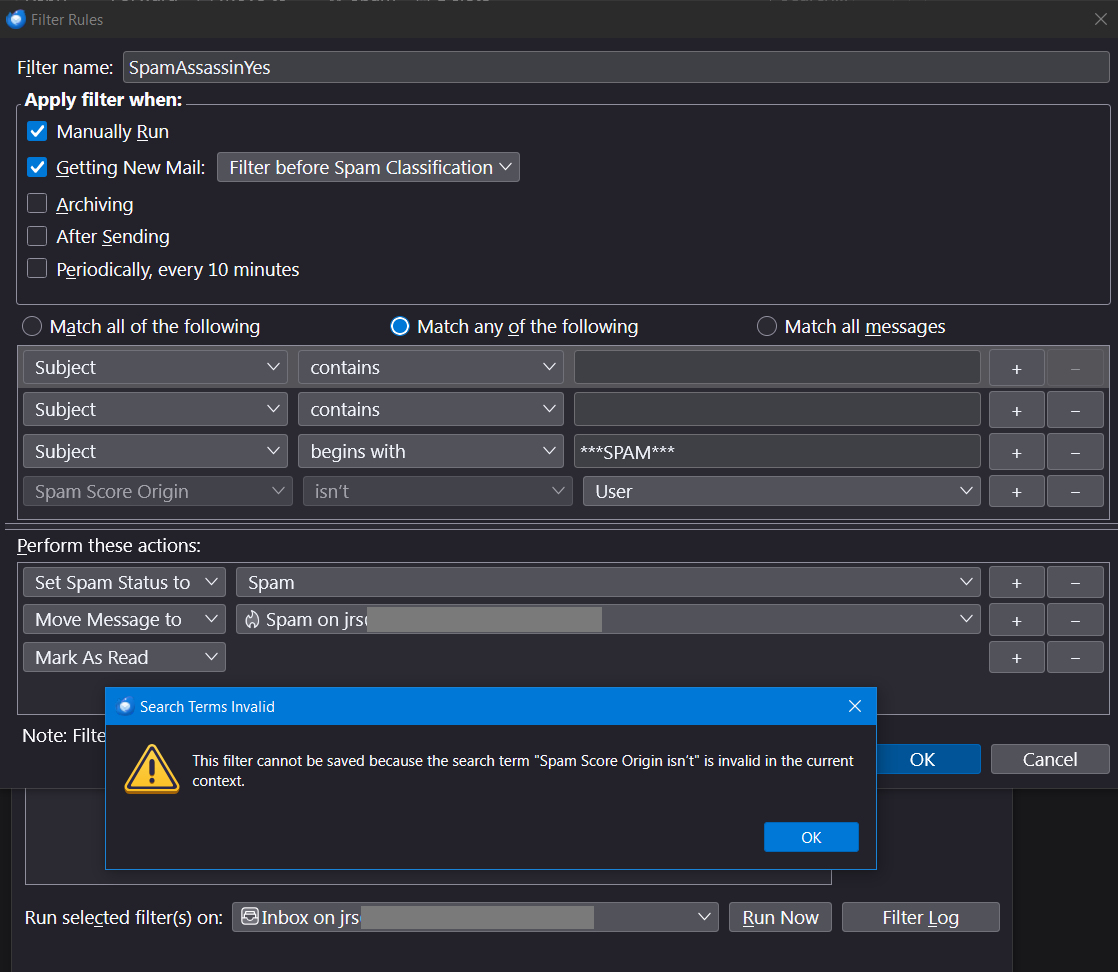
That could be the problem. I checked all the filters--they were set up years ago--and somehow SpamAssassin had added three lines. Two were blank and one had something about Origin. I deleted one of the blank lines, but the minus sign next to the other was shaded. I tried various things. Also it wouldn't save because of the Origin line, so I deleted that too. Since I couldn't get rid of the other line, I filled it in with "aardvark".
Then I sent a test message and it ended up in Spam. I'll try rebooting.
Giải pháp được chọn
Rebooting didn't help, so after trying different things, I finally just disabled SpamAssassin and restarted Thunderbird, but it still didn't work. I then found that something added a blank line to one of my other spam lists. After deleting that and rebooting, it seems to be working okay now...at least until whatever is causing this adds another blank line.
Thank you for your assistance with this.
Cheers, John